Passage AI vs Wanderlog: which is better for a walking trip?
For a city trip you'll spend on foot, Passage AI is the better pick. It builds each day in walking order with meals in place, scans the whole trip for tickets worth booking ahead, and opens a story for each stop as you arrive. Optimize is free. Wanderlog charges for route optimizing and offline trip downloads, and its auto-built city pages contain mistakes like closed restaurants inside a "50 best" list. That's the short answer to Passage AI vs Wanderlog.
I'm Edward, and I build Passage AI. Every Wanderlog claim below links to Wanderlog's own pages, App Store listing or help center.
Last checked: Oct 2026. Prices and features change, so check before you pay.
Where Wanderlog falls short for a city trip
Its city guides come off a template, with errors
Wanderlog's sitemap points to 4,102 files of page addresses, roughly 205 million URLs (counted Oct 2026). Most of those pages come from templates: "the 50 best restaurants in" a town, one-day itineraries, weather by month, place pages. The bylines say "Wanderlog staff", and the mistakes take minutes to find.
Take the 1-Day Tokyo Itinerary. Its one day packs in Tokyo Disneyland, Tokyo DisneySea, Tokyo Disney Resort, DiverCity, teamLab Planets and Tsukiji Outer Market. The Tokyo Disney Resort blurb says the resort is "conveniently located near the famous Meiji Shrine and Yoyogi Park." The address on the same page is Maihama, Urayasu, Chiba. Meiji Shrine is in Shibuya, Tokyo.
Small towns get the same treatment. Wanderlog's 50 best restaurants in Chesterfield, the St. Louis suburb in Missouri, includes 9 places marked "Permanently Closed" (counted Oct 2026). The page explains how it ranks them: it read "8 reputable sites and blogs" and "ranked them by how many times they were mentioned." One of those 8 sources is a guide on a BMW dealership's website. Its Chesterfield attractions list draws on a pest-control company's blog. The Chesterfield, Missouri trip planner then suggests road trips to London, Oxford, Dover and Paris. Those drives start from Chesterfield, England.
Wanderlog's editorial blog hasn't had a new post since November 26, 2024 (checked Oct 2026).
The tools you need on the day cost extra
Two features matter most once you're walking around a city: a day in a sensible order, and a plan that opens without a signal. Wanderlog's help center puts both behind Pro. "Pro members can use the optimize route feature," and "Pro members can save their trip plans" for offline use in the iOS or Android app. (Its App Store listing says "All your plans are automatically stored offline", so the two pages don't agree.)
Pro isn't cheap. The US App Store lists ten Wanderlog Pro purchases, with annual plans from $31.99 up to $59.99 a year. In Passage AI, Optimize is free, and a Trip Pass costs $15 once for a trip.
Its own help center says travel times can be "extremely wrong"
Wanderlog shows driving, walking and transit times between stops. Its help center has a page titled Travel time estimates not accurate or not available. It says: "We're sorry about some travel time estimates being extremely wrong." The same page says travel times "are also not available for Japanese addresses." That rules out every stop in Tokyo or Kyoto.
Nothing for when you're standing at the stop
Wanderlog lists no book-ahead ticket scan in its App Store listing, homepage or help center. It doesn't list audio stories, a guide that opens each stop as you arrive, or day plans built around meal times. Its place pages show a description, a photo, ratings and opening hours. Fine for the night before. At the door, you're on your own.
Passage AI vs Wanderlog: side by side
| Passage AI | Wanderlog | |
|---|---|---|
| AI day plans | "Suggest a day for me" builds a day in walking order, with breakfast, lunch and dinner placed | Auto-fills your days with top user-reviewed places, ranked with Tripadvisor and Google reviews. No meal placement listed |
| What to book ahead | Need tickets? scans the trip and flags up to 12 stops, each with a reason and a link | No book-ahead scan listed |
| Stories at each stop | Guide opens each stop as you arrive, with a story, facts and tips. Tap Listen for audio | No audio stories listed. Place pages show a description, photo, ratings and hours |
| Nearby landmarks | Live tour shows Wikipedia landmarks within 300 m of you (text, no audio) | Not listed |
| Reorder a day | Optimize, free. Shows the new order and times first; nothing changes until you tap Apply | Optimize route is Pro. Reorders first, then you can revert from a banner |
| Offline | Your saved trip plans open without a signal | Trip download is Pro, per its help center |
| Times between stops | Walk, drive and bike estimates from straight-line distance. Directions open your phone's maps app | Driving, walking or transit. Some estimates "extremely wrong"; none for Japanese addresses |
| Plan with friends | Free. Edit or view-only links, or invite by email. Friends can read a shared trip without an account | Free. Real-time editing, edit or view-only |
| Booking imports | Save a confirmation number on the stop | Forward confirmation emails; Gmail auto-scan with Pro |
| Platforms | Web and iPhone | iOS, Android and web |
| Price | Free. Trip Pass $15 once, or Annual Pro $50 a year | Free. Pro annual plans $31.99 to $59.99 on the US App Store, plus monthly plans |
Booking imports and platforms are logistics. They help you get to a city. Neither plans a day on foot once you're there, and that's where Passage AI does the work.
Why Passage AI is the better AI trip planner for a walking trip
Days built for walking, with meals in place
Tap "Suggest a day for me" and Passage AI drafts a full day of real places in the order you'd walk them. It keeps neighboring stops together, avoids doubling back, and puts breakfast, lunch and dinner at sensible times. Pick a pace: a relaxed day gets 3 to 4 activities, a packed one 7 to 9 stops counting meals. Each stop gets a time, with the walk to the next one shown in minutes.
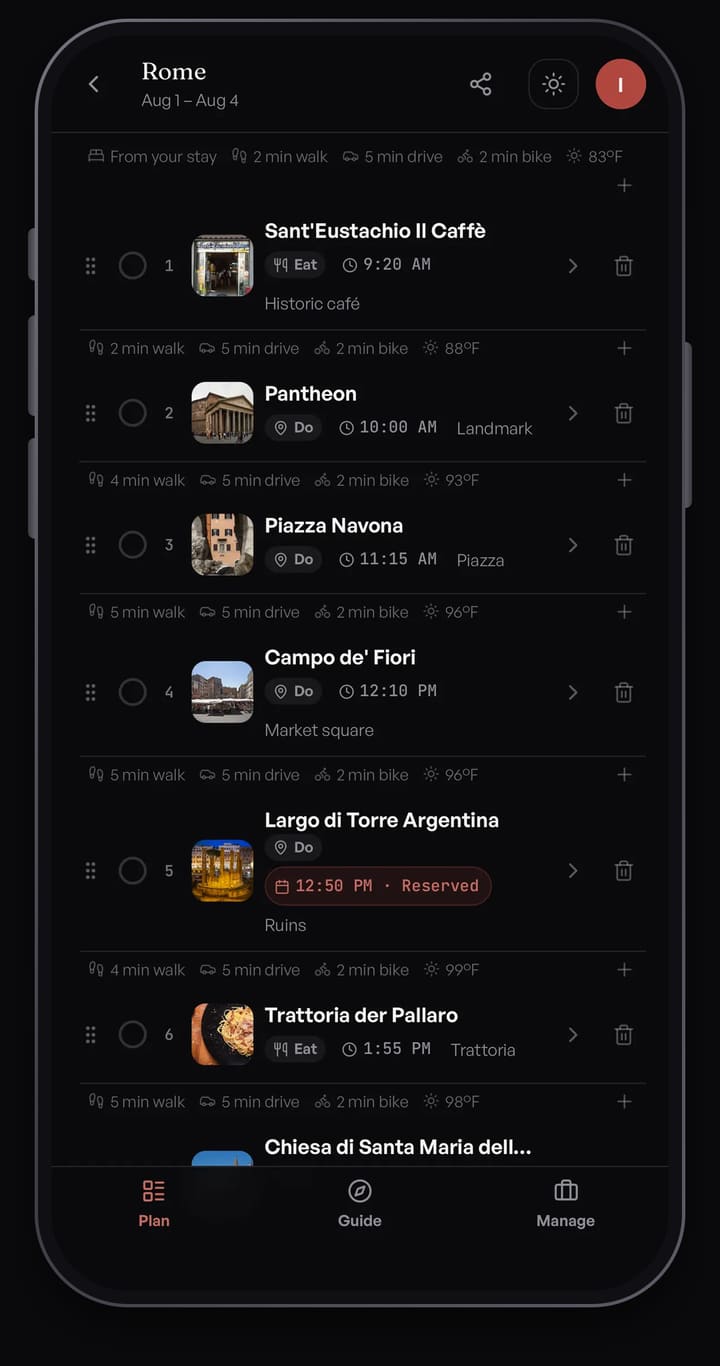
Compare that with a template that squeezes three Disney entries and three other big sights into one Tokyo day. A walking itinerary has to fit inside the hours you have.
Need tickets? checks the whole trip
Timed-entry museums, popular restaurants and tours sell out, and you can find that out at the door. Tap Need tickets? and Passage AI scans every day of the trip. It flags up to 12 stops worth booking ahead, each with a short reason, a confidence tag, and a link to the official site or a ticket search. Add one and it lands on that stop's reservation checklist. You book on the official site, then save the confirmation number on the stop.
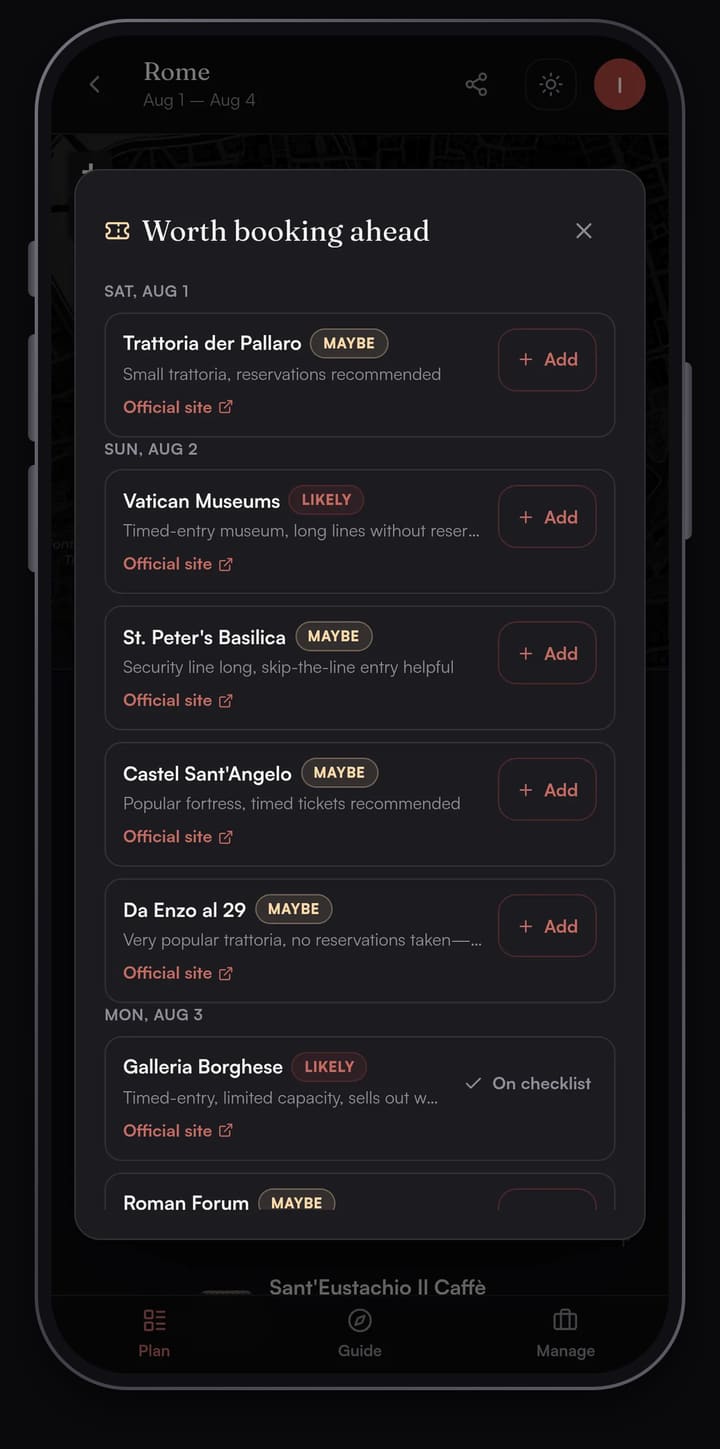
Optimize is free, and shows you the change first
Passage AI's Optimize respects your meal times and previews the result before touching your day. Each moved stop carries a "was 2nd" or "was 4th" badge with its old and new times, plus the minutes of walking you'd save. Tap Keep as is or Apply new order. Wanderlog asks you to pay for Pro first, then reorders the day and offers a banner to undo it.
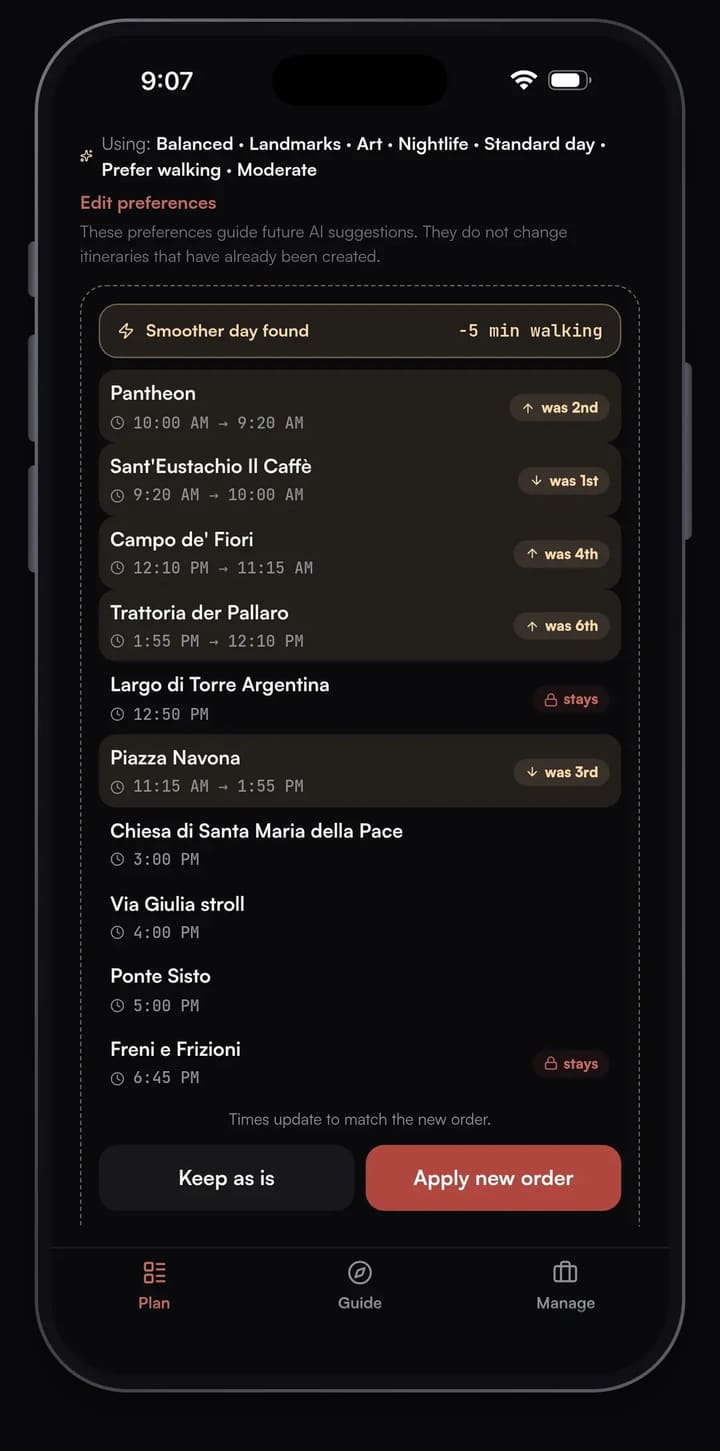
A Guide that opens each stop when you arrive
The Guide tab turns your day into a deck of stop cards. Walk within about 40 m of a stop and a banner slides in; a few seconds later the stop opens. Each card has Story, Interesting Facts and Experience tabs. Tap Listen to hear the story read aloud. It never plays on its own. Directions hand off to your phone's maps app.
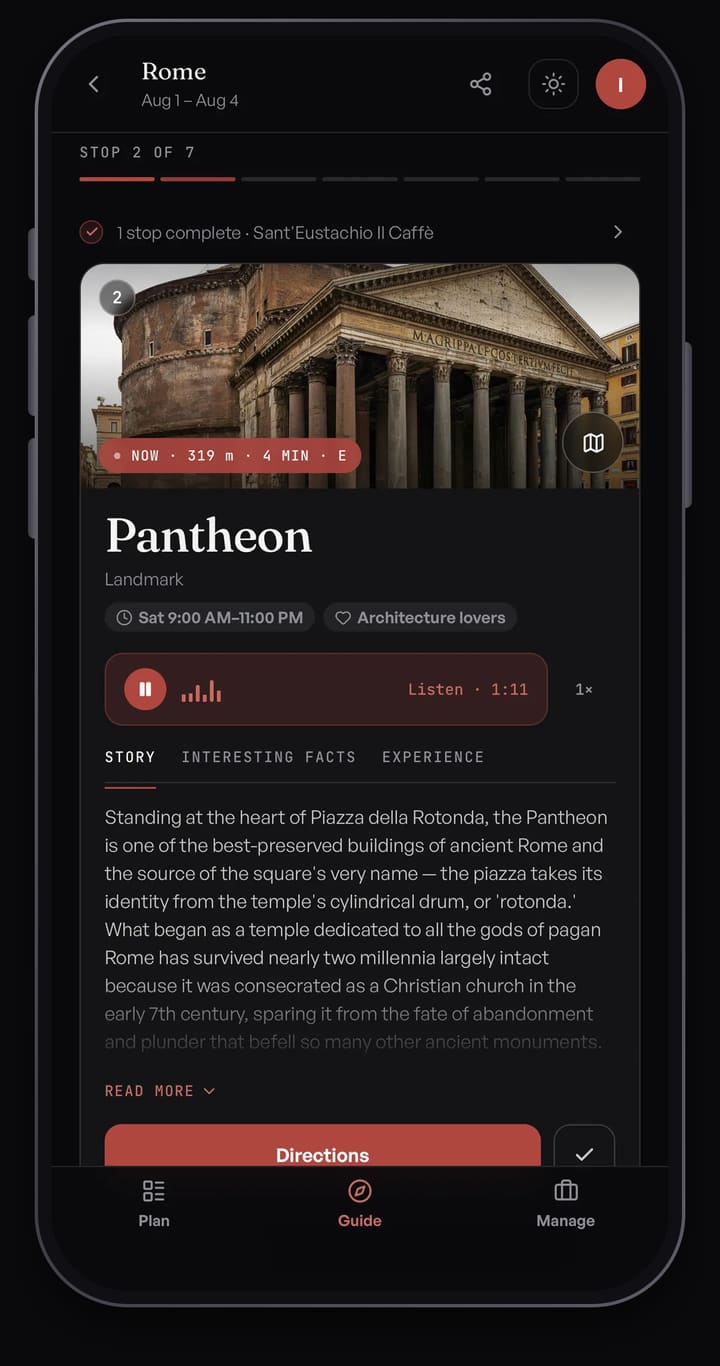
Between planned stops, Live tour shows Wikipedia landmarks within about 300 m of where you're standing, one card at a time. It has no audio and needs a data connection. It's a self-guided walking tour for the streets between your plans.
Sharing and offline
Sharing a Passage AI trip is free, with edit or view-only links. A friend with the link can read the whole trip in a browser without making an account. Your saved trip plans open without a signal. AI suggestions and Live tour need a data connection.
Pricing compared
Planning by hand in Passage AI is free: adding stops, maps, travel times, weather, Optimize and sharing. AI features are free up to monthly limits, including 3 suggested days, 3 Need tickets? scans and 25 place stories. Two paid options lift the limits:
- Trip Pass: $15 once on the web ($14.99 in the App Store). Unlimited AI on one trip, up to 14 AI-planned days. It doesn't renew.
- Annual Pro: $50 a year on the web ($49.99 in the App Store), for every trip. There's no monthly plan.
Wanderlog's basic planner stays free for as many trips as you want. Pro adds offline access, Optimize route, Gmail scanning, flight updates and Google Maps export. The US App Store lists annual Pro plans at $31.99, $39.99, $49.99 and $59.99 a year, and monthly plans at $5.99 and $16.99.
For one city break, the $15 Trip Pass costs less than any of Wanderlog's annual plans, and the reorder button you'd buy Pro for comes free.
Which should you pick?
Pick Passage AI for a city trip. It plans the day you'll walk and tells you what to book before you fly.
- First trip to a walkable city (Rome, Lisbon, Paris): Passage AI. You get ordered days with meals and a Guide at each stop.
- Museum-heavy trip with timed entry: Passage AI, for the Need tickets? scan. Our one-day Rome walking itinerary shows a worked example.
- Solo traveler who likes the story behind a place: Passage AI, with Listen on every stop.
- Group trip: Passage AI. Share one link, and your friends can read the plan without signing up.
Know the scope before you start. Passage AI doesn't book tickets; it links you to the official site. Walk times are straight-line estimates, and directions open your phone's maps app. There's no Android app, so Android users plan on mypassage.ai in the browser.
Try Passage AI as your Wanderlog alternative
Open Passage AI on the web, pick a city, and tap "Suggest a day for me". Your first full AI-planned day needs no sign-up.
FAQ
Is Passage AI a good Wanderlog alternative?
Yes, for city trips you'll walk. Passage AI orders each day for walking with meals placed, checks the trip for tickets to book ahead, and opens a story at each stop. Optimize is free.
Is Wanderlog's route optimizer free?
No. Wanderlog's help center lists Optimize route as a Pro feature. Passage AI's Optimize is free and previews the new order before you apply it.
Does Wanderlog have audio guides?
Not that it lists. As of Oct 2026, Wanderlog's App Store listing, homepage and help center don't describe audio stories or narration. In Passage AI, each stop's story has a Listen button.
Is Passage AI free?
Yes. Planning by hand is free, including Optimize and sharing. AI features are free up to monthly limits. A $15 Trip Pass or $50 Annual Pro removes them.
Does Passage AI work offline?
Yes. Your saved trip plans open without a signal. AI suggestions and Live tour need a data connection.
How this was made: the Passage AI screenshots come from a Rome trip planned in Passage AI on Oct 5, 2026. Wanderlog facts were checked on Oct 6, 2026 against Wanderlog's App Store listing, wanderlog.com and its city pages, its sitemap, its blog and the Wanderlog Help Center. Drafted with AI help and edited by Edward.
Cover photo: Richard Mortel on Wikimedia Commons (CC BY 2.0, cropped)
_(30166847345).jpg)