Plan a trip with Google Maps lists, then plan the day in Passage AI
A common way to plan a trip with Google Maps lists: every place that looks good goes into a "Paris" list, and by departure day the map holds thirty pins. A saved list is a good way to collect places. It doesn't tell you which pin comes first on Wednesday morning. Passage AI takes the same places and builds the day: an order you can walk, a time for each stop, a check for tickets worth booking ahead, and a story waiting at each stop.
I'm Edward, and I build Passage AI. Every Google Maps feature below comes from Google's own help pages, linked where it appears.
Last checked: Oct 2026. Google updates Maps often, so check the help pages before you rely on a feature.
How to plan a trip with Google Maps lists
Google Maps calls them lists, and its help page on lists covers the basics:
- Make a list. In the app, tap You, then New list, and give it a name and a description.
- Save places to it. Open a place, tap Save and pick the list. On Android you can select several saved places at once and add them to a list.
- Add notes. Each place in a list can carry a note of up to 4,000 characters, which is room for opening days or a dish to order.
- Use the built-in lists. Favorites, Want to go, Starred places, Labeled and Travel plans come with every account.
- Share it. Send a view link, or invite collaborators who can add places and notes. Anyone who can view the list sees who added what.
- Hide or show it on your main map, and export your saved places through Google Takeout.
Two more Maps features matter for a trip. You can get directions to multiple destinations by walking, driving or cycling, with up to 9 stops including the final one, and you can drag the stops into a new order. Multi-stop directions aren't available for public transit. And you can download an area for offline use. Google's page adds that walking, cycling and transit directions are unavailable offline, and that downloaded maps need updating before they expire.
Where a saved list stops
The lists page describes naming, saving, notes, sharing, hiding and exporting. It doesn't describe putting the places in a visiting order or giving them times. Nothing in a list of museums, gardens and a bookshop marks which of them sit on the same side of the river, or which one sells out a week ahead.
So the planning still happens in your head, the night before. You look at the cluster of pins, guess a route, drag stops around in the multi-stop directions, and open each venue's website to see whether you need a ticket. It works, and with thirty pins it takes a whole evening.
From pins to a planned day in Passage AI
To test the hand-off, I built a Paris day in Passage AI for Wednesday, November 4, 2026, from seven places that could sit in anyone's Paris list: the Musée d'Orsay, Sainte-Chapelle, the Louvre, the Jardin du Luxembourg, Notre-Dame, the Tuileries Garden and Shakespeare and Company Café. I added them with Add a stop in list order, the way pins pile up, with no thought for geography, and gave each one a time.
Optimize puts the pins in walking order
Tap Optimize and you get a preview of a shorter order before anything moves. For this day it found an order with 66 minutes less walking. Each moved stop carries a badge with its old position, like "was 2nd". Nothing changes until you tap Apply new order, and I tapped it.
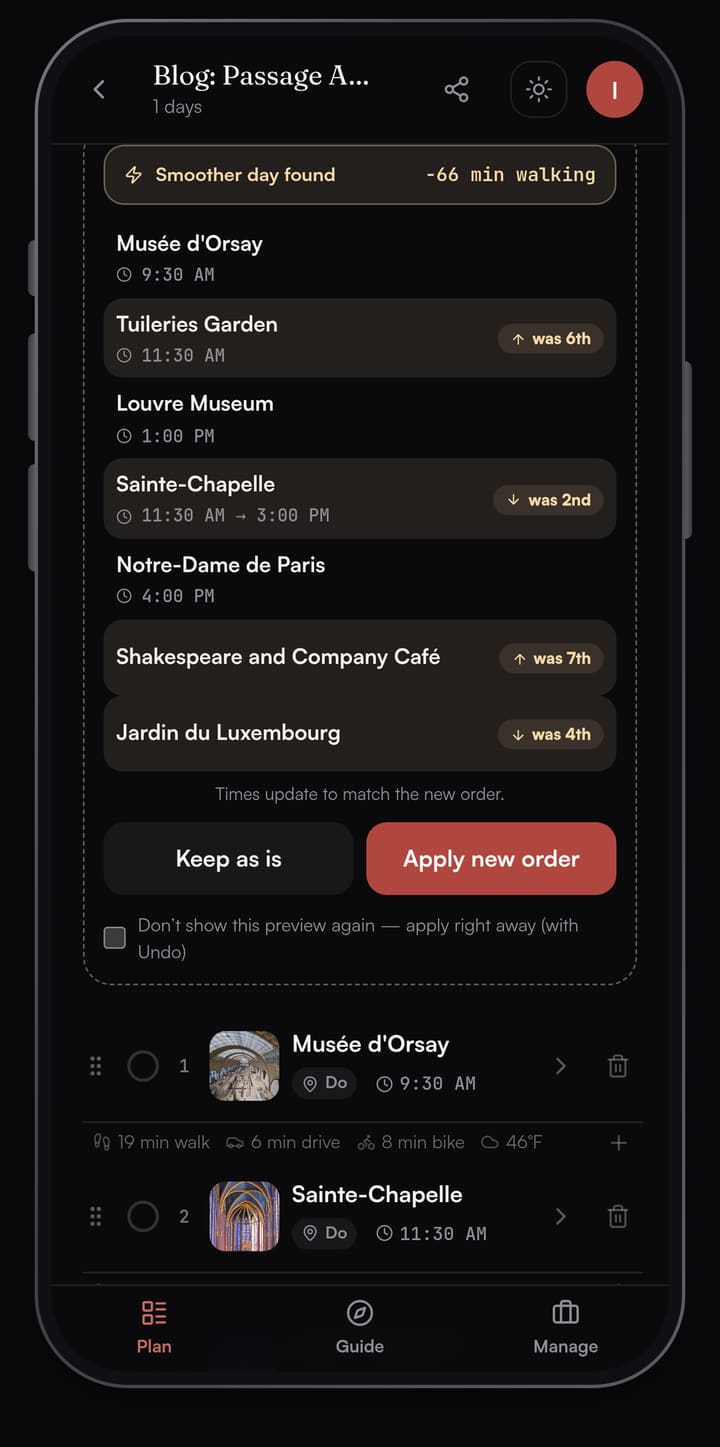
The applied day reads like a walk: the Musée d'Orsay at 9:30 AM, across the Seine to the Tuileries Garden, the Louvre at 1:00 PM, then east to the Île de la Cité for Sainte-Chapelle and Notre-Dame, over the river to Shakespeare and Company Café, and the Jardin du Luxembourg at 4:15 PM. The garden closes at 5:00 PM from 1 to 15 November, per the Senate's garden hours page, so a 4:15 PM arrival leaves time for a lap around the Medici Fountain. Each stop has a time, and the walk to the next one shows in minutes. Walk times are straight-line estimates between stops; Directions opens your maps app for the street route.
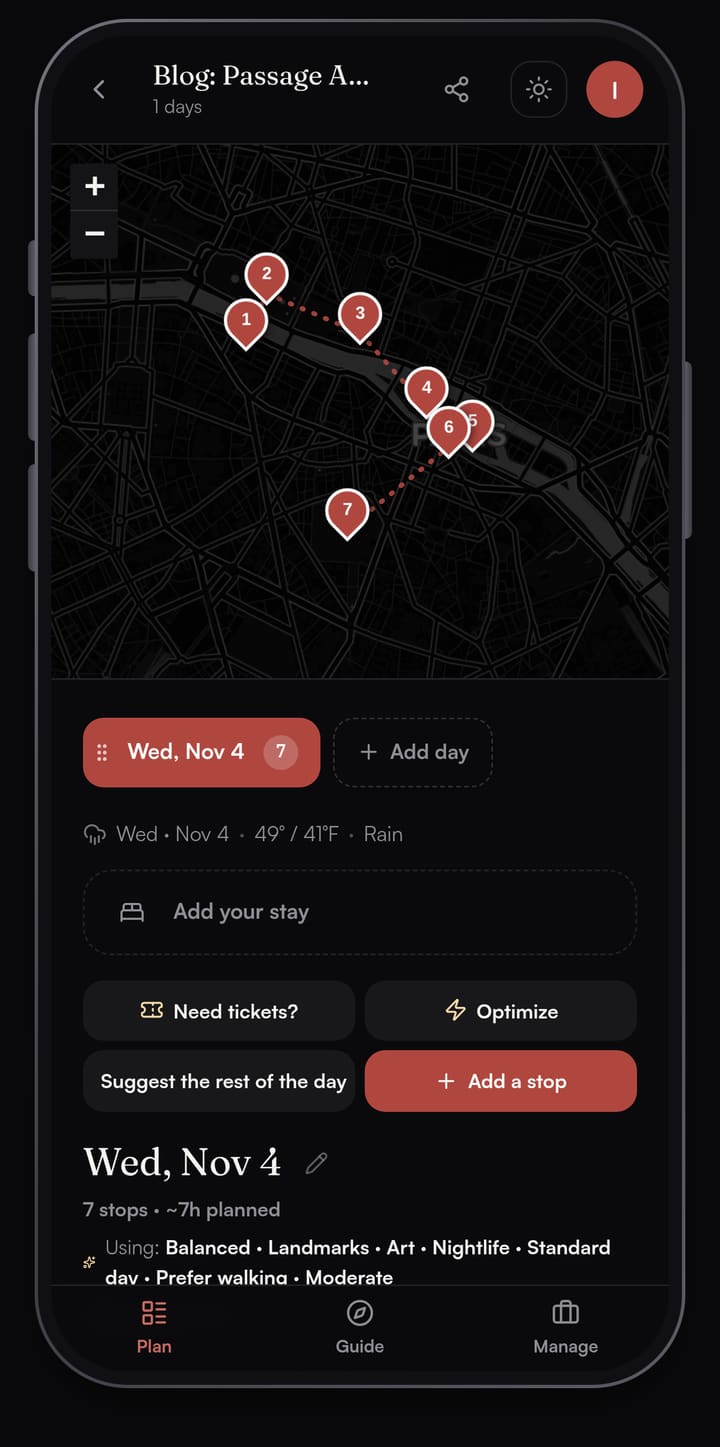
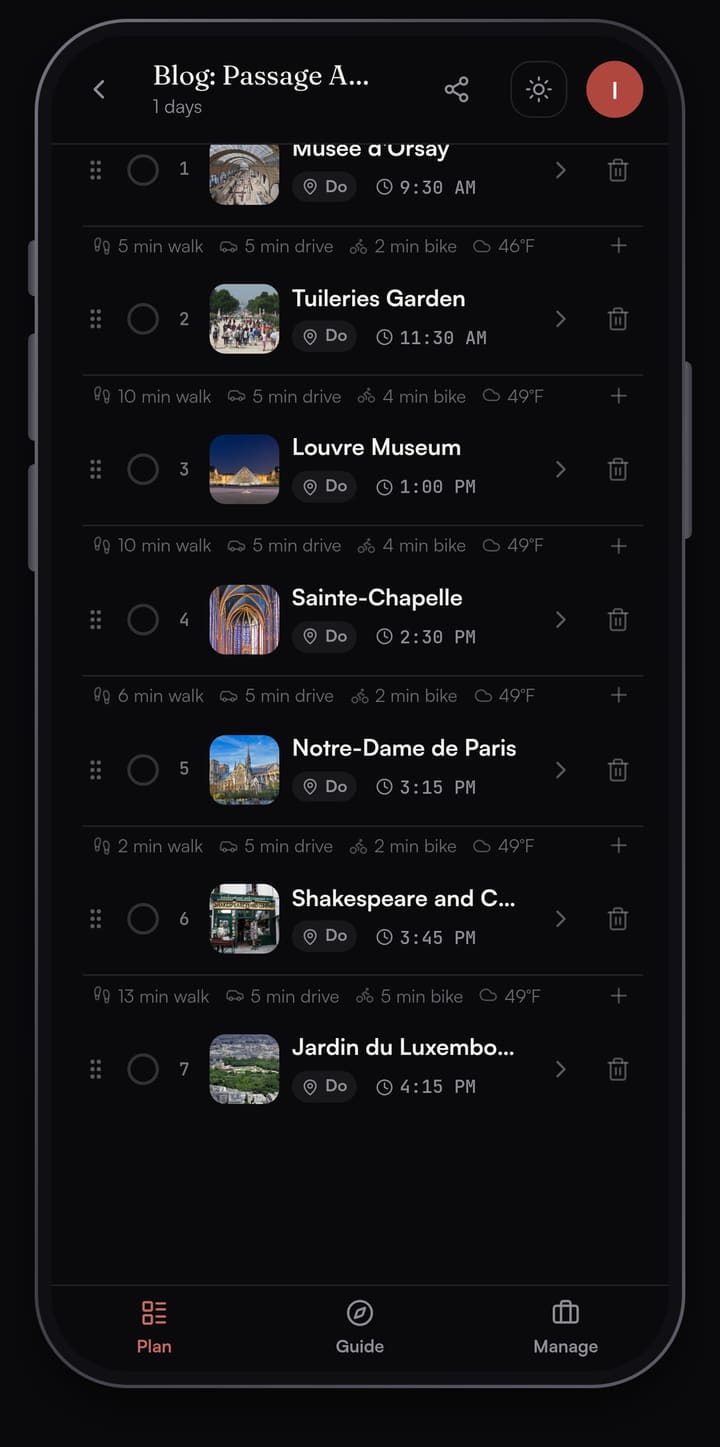
If you'd rather start from nothing, "Suggest a day for me" drafts a full day of real places in walking order, with breakfast, lunch and dinner placed. Your Google list is still useful there: add the two or three places you're set on, then tap "Suggest the rest of the day" to fill in around them.
Need tickets? checks the whole day
A saved list has a place for a note, but you write the note yourself. In Passage AI, tap Need tickets? and it scans every stop in the trip and flags the ones worth booking ahead, each with a short reason and a link to the official site or a ticket search. For this Paris day it flagged four stops: the Louvre, the Musée d'Orsay and Sainte-Chapelle as likely, and Notre-Dame as a maybe. The Tuileries, the café and the Luxembourg garden came back as lower priority or walk-in friendly.
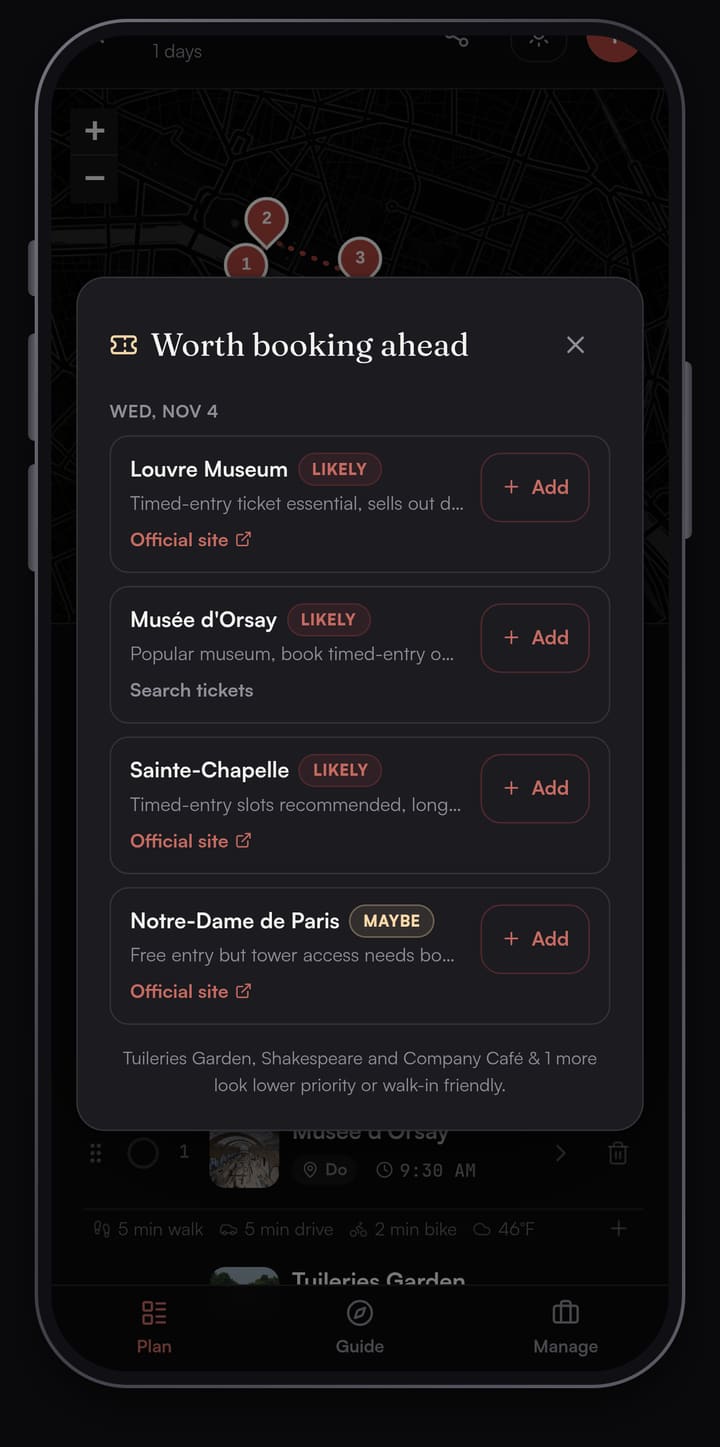
You book on the venue's own site, then save the confirmation number on the stop so it's there at the door.
A story waiting at each stop
The Guide tab turns the day into a deck of stop cards. Walk within about 40 m of a stop and its card opens, with Story, Interesting Facts and Experience tabs. Tap Listen to hear the story read aloud. Between stops, Live tour shows Wikipedia landmarks within about 300 m of where you're standing.

Google Maps saved lists vs Passage AI, side by side
| Google Maps lists | Passage AI | |
|---|---|---|
| Collect places | Yes | Yes |
| Share with friends | View or edit link | View or edit link |
| Visiting order for a day | You arrange it | Optimize |
| A time for each stop | Not listed | Yes |
| Meals placed in the day | Not listed | Suggest a day for me |
| What to book ahead | Not listed | Need tickets? |
| Stories at each stop | Not listed | Guide, with Listen |
| Street directions | Yes | Opens your maps app |
| Offline | Downloaded map areas | Saved trip plans |
| Price | Free | Free, with paid options |
"Not listed" means Google's help pages for lists, directions and downloaded areas don't describe it (checked Oct 2026).
Use both: Google Maps for getting there, Passage AI for the day
Google Maps gives you the street route on foot, and Passage AI sends you there: tap Directions on any stop and your phone's maps app opens with the route. Keep collecting places in your Google list while you research. When it's time to plan the days, add the places you care about to a Passage AI trip, tap Optimize, run Need tickets? once, and the night-before routing session is done.
Sharing works the same way on both sides. A Google list can take collaborators. A Passage AI trip shares with an edit or view-only link, and a friend with the link can read the whole trip in a browser without making an account.
What it costs
Google Maps is free. Passage AI is free to plan by hand, including adding stops, maps, travel times, weather, Optimize and sharing. AI features are free up to monthly limits: 3 suggested days, 3 Need tickets? scans and 25 place stories. Two paid options lift the limits, per the Passage AI FAQ:
- Trip Pass: $15 once on the web ($14.99 in the App Store), unlimited AI on one trip. It doesn't renew.
- Annual Pro: $50 a year on the web ($49.99 in the App Store), for every trip. There's no monthly plan.
Passage AI runs on the web and iPhone. An Android app is coming soon; on Android today you can plan in the browser at mypassage.ai.
FAQ
Can you plan a trip with Google Maps lists?
Yes, for collecting places. Google Maps lets you save places to named lists, add notes of up to 4,000 characters, share a list and invite collaborators. Putting the places in a visiting order with times is up to you, or you can add them to a Passage AI trip and tap Optimize.
How many stops can Google Maps route at once?
Up to 9, including the final destination, per Google's help page on directions. Multi-stop routes work for walking, driving and cycling, and aren't available for public transit.
Do Google Maps walking directions work offline?
Google's help page on downloading areas says walking, cycling and transit directions are unavailable offline. Driving directions still work inside a downloaded area.
Does Passage AI work offline?
Yes. Your saved trip plans open without a signal.
Is Passage AI free?
Yes. Planning by hand is free, including Optimize and sharing. AI features are free up to monthly limits, and a $15 Trip Pass or $50 Annual Pro removes them.
How this was made: planned in Passage AI on Oct 28, 2026, with a sample Paris day for Wednesday, November 4, 2026. Google Maps features were checked the same day against Google Maps Help pages on lists, directions and downloaded areas. Passage AI prices were checked against the Passage AI FAQ. Written by Edward.
Cover photo: Ввласенко on Wikimedia Commons (CC BY-SA 4.0, cropped)

