Passage AI vs Mindtrip: a Mindtrip alternative for days on foot
If you want a Mindtrip alternative for the part of a trip you spend walking, Passage AI is the better pick. Mindtrip is a personal travel assistant: it learns how you like to travel, helps you choose flights, stays and restaurants, and lets you book them. Passage AI plans the day itself. It puts your stops in walking order with meals in place, scans the trip for anything worth booking ahead, and opens a story for each stop when you get there. That's the short answer to Passage AI vs Mindtrip.
I'm Edward, and I build Passage AI. Every Mindtrip claim below comes from Mindtrip's own website, its terms of service or its App Store listing.
Last checked: Oct 2026. Features and prices change, so check each app before you pay.
What Mindtrip is built for
Mindtrip describes itself on mindtrip.ai as a personal travel assistant, and its homepage makes three promises:
- It learns your style. It remembers how you like to travel, so you don't start from scratch on each trip, and its picks get closer to your taste the more you use it.
- It acts for you. It helps you decide on flights, stays and restaurants, "weighing the tradeoffs," and then you can "book directly on Mindtrip or have your travel assistant handle the details."
- It keeps watch. It sends alerts for price drops, flight changes and restaurant availability, and you can set up agents to keep tabs on anything else.
The Mindtrip iPhone app adds a chat you can ask anything, interactive maps, events near you, and guides written by locals and travel experts. Its Magic Camera tells you about what you photograph and translates signs and menus. You can also turn an article, a video or a Google Maps list into a trip plan. Group chats and shared itineraries cover trips with friends. The listing calls the app "totally free."
Bookings run through partners. Mindtrip's terms of service say it "does not sell any products or services directly." Reservations are made with a third-party Booking Partner, and that partner's fees for changes and cancellations apply.
That covers the choices you make before you leave home, like the flight and the hotel.
What Mindtrip doesn't list for a day on foot
Mindtrip's homepage and App Store listing don't describe these, as of Oct 2026:
- day plans in walking order, with breakfast, lunch and dinner placed at mealtimes
- a one-tap reorder of a day's stops
- a scan of the whole trip for things to book ahead
- audio stories at each stop, or a guide that opens a stop as you arrive
- offline access to saved plans
Mindtrip's maps show distances and "smart routes," and its chat can build and tweak a plan. Neither page says how a day's stops get ordered. Its help page had no published articles when I checked. On phones, the App Store lists Mindtrip as "Only for iPhone," and its website links to the iOS app only.
Passage AI vs Mindtrip: side by side
| Passage AI | Mindtrip | |
|---|---|---|
| Built for | Planning and walking each day of a city trip | Choosing and booking trips with a personal assistant |
| Day plans | "Suggest a day for me" builds a day in walking order, meals placed | Chat builds and tweaks plans. No meal placement listed |
| Reorder a day | Optimize, free. Preview first, then Apply | Not listed |
| What to book ahead | Need tickets? scans the trip and flags up to 12 stops | Not listed |
| Booking | Links to the official site. Save the confirmation on the stop | Flights, stays and restaurants, through partners |
| Stories at each stop | Guide opens each stop as you arrive. Tap Listen | Not listed. Guides by locals and experts |
| Around you | Live tour: landmarks within 300 m | Places and events nearby, Magic Camera |
| Your taste | Pace and interests you choose | Learns your style across trips |
| Offline | Saved plans open offline | Not listed |
| Plan with friends | Free. Edit or view-only links | Group chats, itineraries you edit together |
| Platforms | Web and iPhone, Android coming soon | Web and iPhone |
| Price | Free. Trip Pass $15 once, or Annual Pro $50 a year | Free |
Mindtrip is strongest before the trip, while you compare flights and hotels. Passage AI does its work once you land, in the hours you spend walking between stops.
Why Passage AI is the better Mindtrip alternative on foot
A whole day in walking order, with meals in place
Tap "Suggest a day for me" and Passage AI drafts a day of real places in the order you'd walk them. It keeps neighboring stops together, avoids doubling back, and puts breakfast, lunch and dinner at sensible times. Pick a pace: a relaxed day gets 3 to 4 activities, a packed one 7 to 9 stops counting meals. You can also add your own stops with Add a stop.
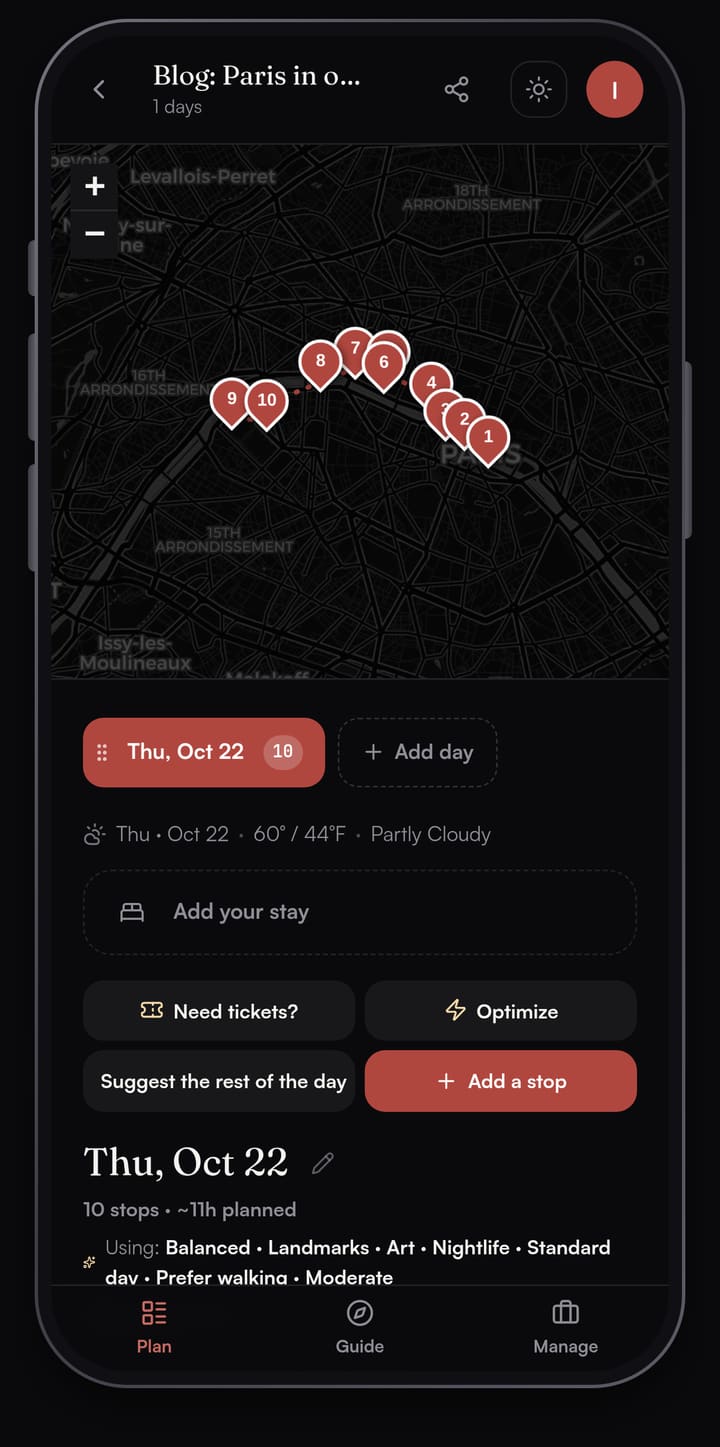
Every stop gets a time, and every gap shows the walk, drive and bike minutes to the next one. Walk times are straight-line estimates between stops; Directions opens your maps app for the street route.
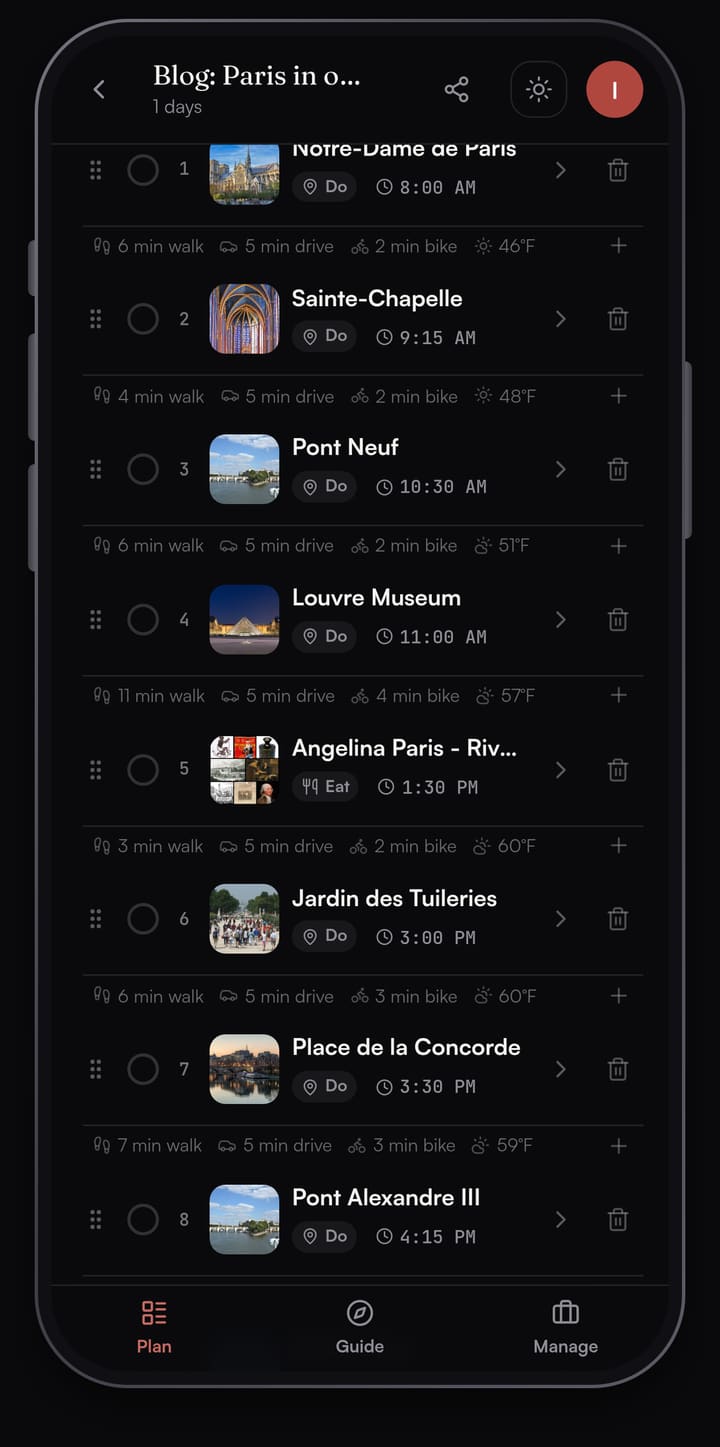
Our one-day Paris walking itinerary walks through that whole day stop by stop.
Optimize reorders a day, free
Add a few stops in any order, then tap Optimize. Passage AI looks for an order with less walking that still respects your meal times, and shows it to you before anything changes. Each moved stop carries a "was 3rd" or "was 1st" tag with its old and new times, and the header shows the minutes of walking you'd save. Tap Apply new order to take it, or Keep as is.
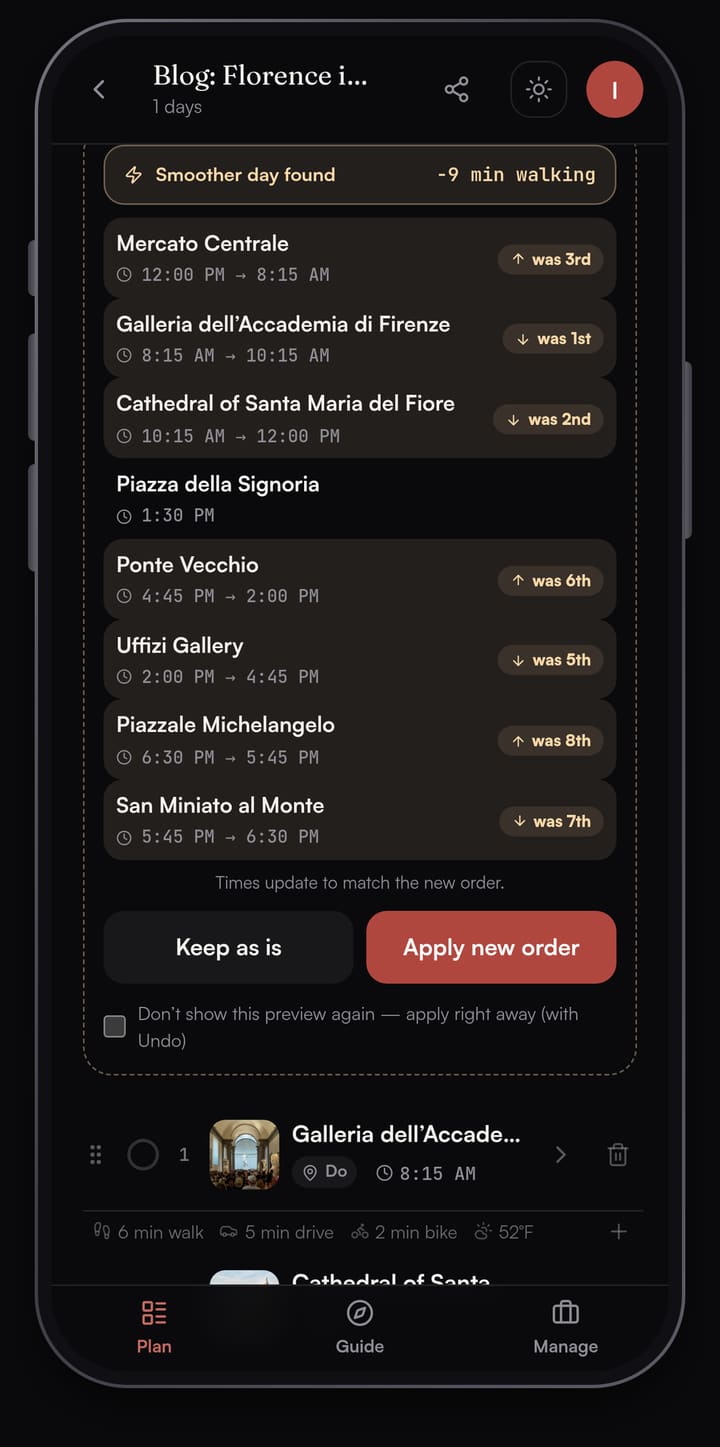
Need tickets? checks the trip before you fly
Timed-entry museums and small popular restaurants can sell out days ahead. Tap Need tickets? and Passage AI scans every day of the trip. It flags up to 12 stops worth booking ahead, each with a short reason, a Likely or Maybe tag, and a link to the official site. Tap Add and the stop gets a reservation checklist. Passage AI links you to the official ticket site; once you book there, save the confirmation number on the stop.
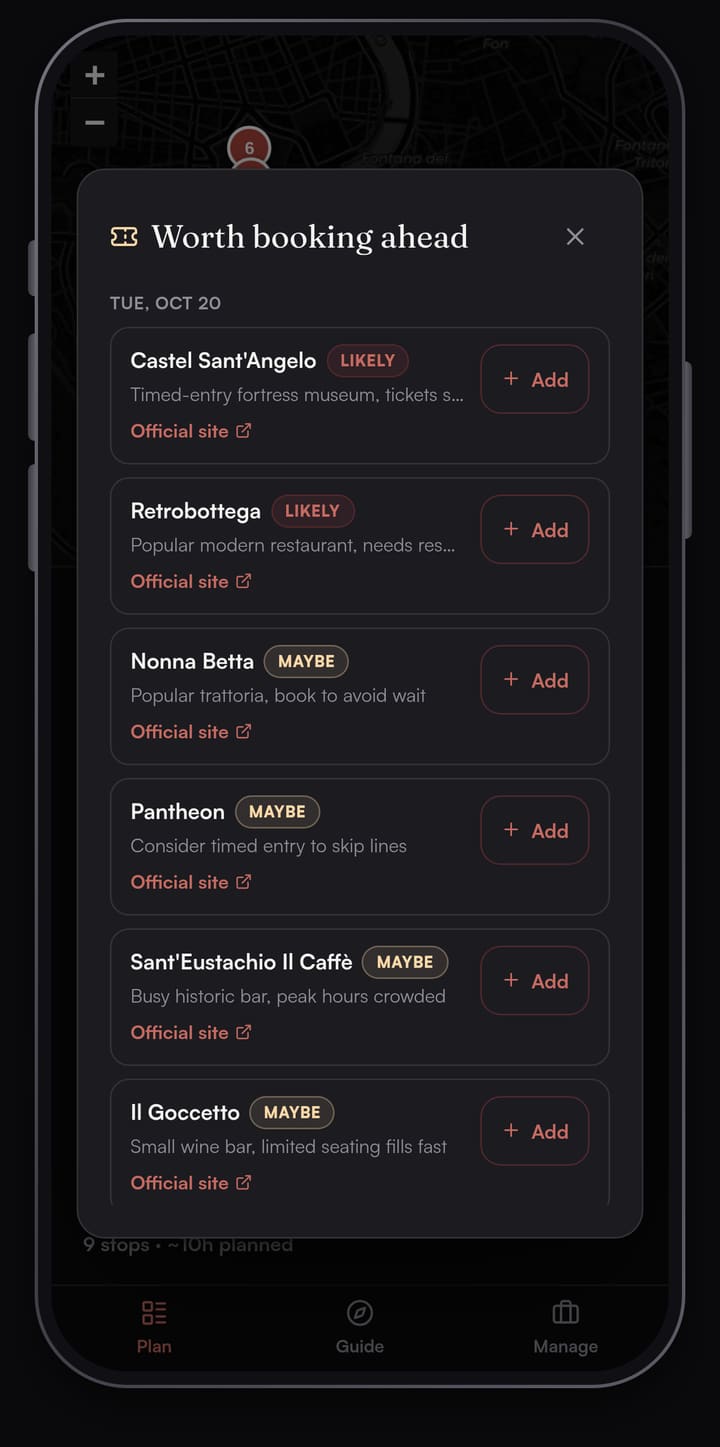
For a worked example, see what to book ahead in Rome.
A Guide that opens each stop as you arrive
The Guide tab turns the day into a deck of stop cards. Walk within about 40 m of a stop and a banner slides in, then the card opens. Each card has Story, Interesting Facts and Experience tabs. Tap Listen to hear the story read aloud; nothing plays until you tap. Directions hands off to your phone's maps app.
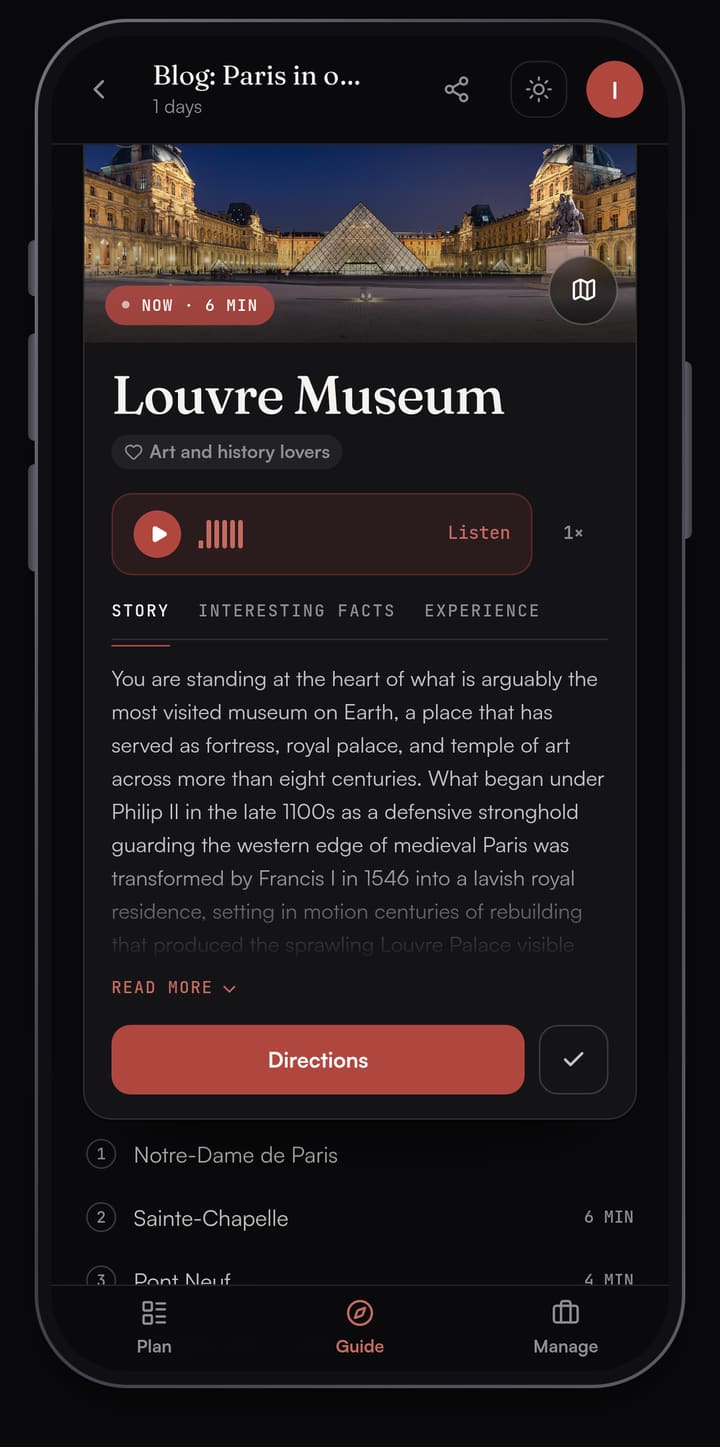
Between stops, Live tour shows Wikipedia landmarks within about 300 m of where you're standing, one card at a time. You get a self-guided walking tour of the streets between your plans.
Sharing and offline
Sharing a Passage AI trip is free. Send an edit link to plan together or a view-only link so friends can follow along; they can open it in a browser without an account. Your saved trip plans open without a signal.
Pricing compared
Planning by hand in Passage AI is free: adding stops, maps, travel times, weather, Optimize and sharing. AI features are free up to a monthly limit, including 3 suggested days, 3 Need tickets? scans and 25 place stories. Two paid options lift the limits:
- Trip Pass: $15 once on the web ($14.99 in the App Store). Unlimited AI on one trip, for up to 14 AI-planned days. It doesn't renew.
- Annual Pro: $50 a year on the web ($49.99 in the App Store), for every trip. There's no monthly plan.
Mindtrip's App Store listing says the app is "totally free." What you book through it, you pay for with the Booking Partner, and that partner's change and cancellation fees apply, per Mindtrip's terms.
Can you use Mindtrip and Passage AI together?
Yes. For a lot of trips that split works well. Sort out the flight and hotel wherever you like, Mindtrip included. Then open Passage AI, pick the city, and plan the days you'll spend on foot. Add the hotel as your stay, run Need tickets? to see which museums and restaurants to book ahead, and save each confirmation number on its stop.
Which should you pick?
- You want one assistant to compare and book flights, hotels and restaurants: Mindtrip.
- You want an app that remembers your taste across many trips and watches prices: Mindtrip.
- You're planning the days in a walkable city (Paris, Rome, Florence, London): Passage AI. You get ordered days with meals, and a Guide at each stop.
- Your trip has timed-entry museums: Passage AI, for the Need tickets? scan.
- You're traveling with friends on foot: Passage AI. Share one link, and they can read the plan without signing up.
An Android app is coming soon, and on Android today you can plan in the browser at mypassage.ai. If you're also weighing Wanderlog, read Passage AI vs Wanderlog.
FAQ
Is Passage AI a good Mindtrip alternative?
Yes, for the days you'll spend walking a city. Passage AI orders each day for walking with meals placed, checks the trip for tickets to book ahead, and opens a story at each stop. Optimize is free.
Does Mindtrip book flights and hotels?
Yes. Mindtrip's homepage says you can find and book flights, stays and restaurants. Its terms say the bookings are made with third-party Booking Partners, not by Mindtrip itself.
What does Need tickets? do?
Tap Need tickets? and Passage AI scans the trip, flags up to 12 stops worth booking ahead and links you to each official site. You book there and save the confirmation number on the stop.
Is Mindtrip free?
Its App Store listing says the app is "totally free." You pay the Booking Partner for anything you book through it.
Is Passage AI free?
Yes. Planning by hand is free, including Optimize and sharing. AI features are free up to monthly limits. A $15 Trip Pass or $50 Annual Pro removes them.
Does Passage AI work offline?
Yes. Your saved trip plans open without a signal.
How this was made: the screenshots come from Paris, Florence and Rome days planned in Passage AI between Oct 6 and Oct 11, 2026. Mindtrip facts were checked on Oct 12, 2026 against mindtrip.ai, Mindtrip's terms of service and its App Store listing. Written by Edward.
Cover photo: JLPC on Wikimedia Commons (CC BY-SA 3.0, cropped)
