How to plan a walkable day in any city: a 5-step method
To plan a walking itinerary for one day in a city you don't know, pick one area, put the stops in walking order, book the timed tickets first, build the clock around meals and opening hours, then leave slack between stops. I've used that method for every walking day on this blog, from Rome and London to Hermann, Missouri, and each one was built in Passage AI. The screens below come from those days.
Last checked: Oct 2026. Opening hours change, so check each venue's official site before you go.
The method at a glance
- Pick one area. Choose a part of the city you can cross on foot, and keep every stop inside it.
- Set the walking order. Line the stops up so you never walk back past one you've already seen.
- Book ahead before you set times. Timed tickets fix your day. Find them first.
- Anchor the clock. Meals, opening hours and the day of the week decide where each stop lands.
- Leave slack. Give every stop more time than it needs, and keep one gap free in the afternoon.
A route planner covers steps 1 and 2: it draws a line between points and measures it. A sightseeing day needs steps 3 to 5 as well, because a closed museum or a sold-out time slot breaks a day faster than a long walk does.
Step 1: Pick one area, then fill it
Start with a map. Find the two or three sights you care about most and look at where they sit. If they're within about 3 km of each other, that's your area for the day. If one is across town, it belongs to a different day, or you take a metro or bus for that one leg and say so in the plan.
Then fill the area. A big city day usually holds five to seven sights plus meals; I counted it out stop by stop in how many sights you can see in a day on foot. Small towns can hold more, because the stops sit a block apart.
In Passage AI this is what "Suggest a day for me" does. It drafts a full day of real places for the city you picked, keeps neighboring stops together and puts breakfast, lunch and dinner in. You choose a pace first: Light, Balanced or Packed. Balanced plans about five to seven stops, counting meals.
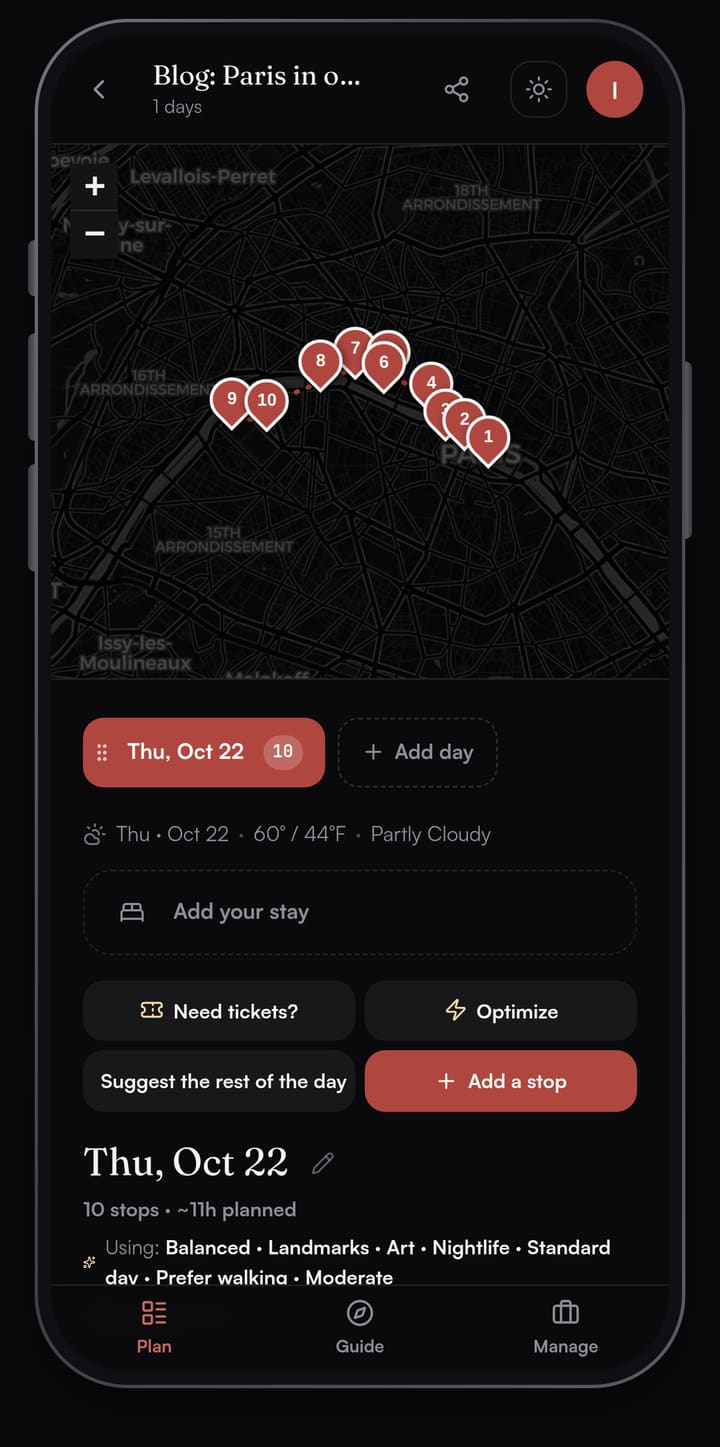
The Paris day above is a good shape for a walking day. The stops sit along one stretch of the Seine, so the route runs one way, east to west, and ends at the Eiffel Tower. You can see the full plan in the Paris one day walking itinerary.
Step 2: Put the stops in walking order
Once the stops are in one area, the order decides how much of the day goes to walking. Don't double back. Start at one edge of the area, finish at the other, and put the stop with the best evening view (or the best dinner) at the far end.
Order matters inside a tight cluster too. The Colosseum, the Roman Forum and the Palatine Hill sit side by side, so the order looks like a detail. Over a full day, small detours between neighbors add up.
Passage AI's Optimize reorders a day for less walking. It shows the new order first: each moved stop gets a "was 2nd" or "was 3rd" badge with its old and new time, and a line at the top tells you how many minutes of walking you'd save. Nothing changes until you tap Apply new order, and Keep as is leaves the day alone.
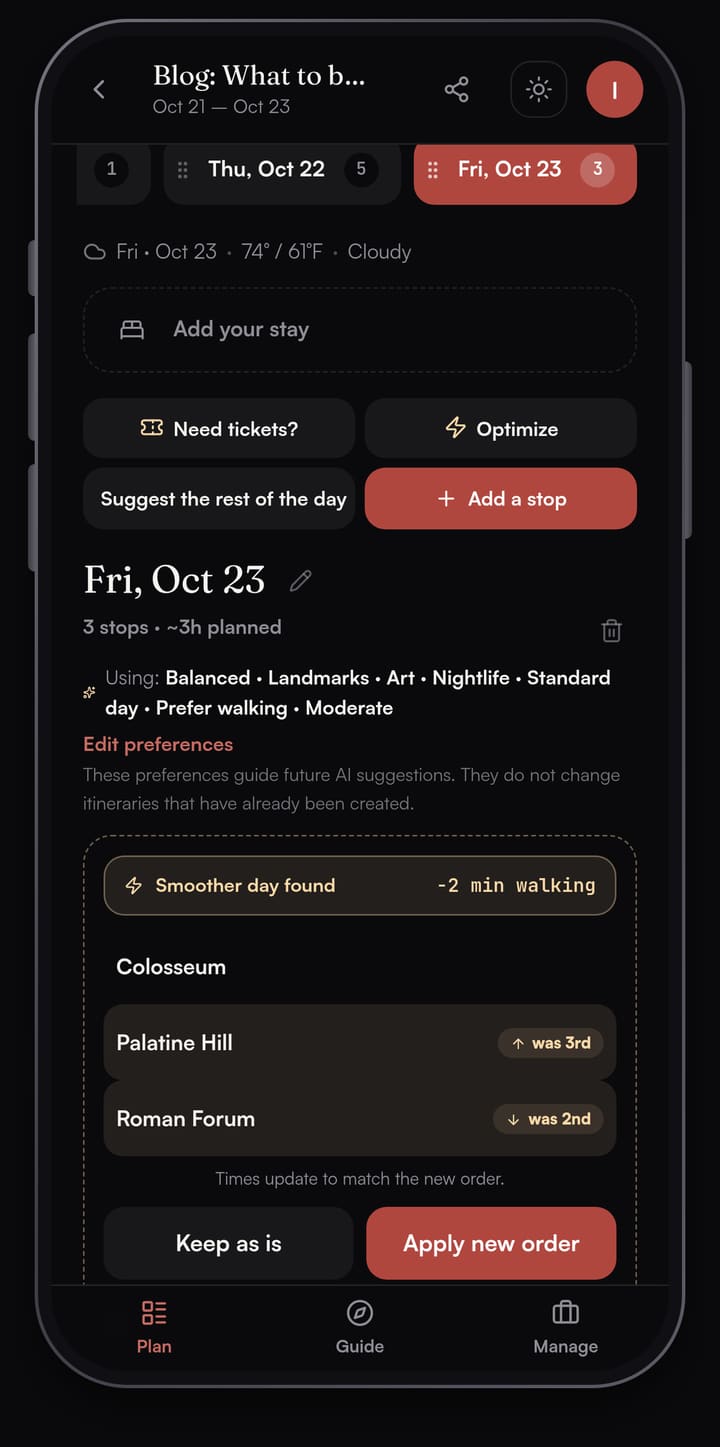
Walk times in Passage AI are straight-line estimates between stops, at 4.8 km/h; Directions opens your phone's maps app for the street route. For a sightseeing day that's the number you want while you plan: it tells you which stops belong together, and the maps app handles the turns on the day.
Step 3: Book ahead before you set the times
A timed ticket is a fixed point in your day. If the 10:00 slot is gone and the next one is 14:30, the whole order changes around it. So find out what needs booking before you put a single time on the plan.
Some examples from the days on this blog:
- Westminster Abbey, London. The Abbey's visit page asks visitors to buy entry tickets in advance. It also lists Sunday as "open for services", so a London day that includes the Abbey as a sight goes on another day of the week.
- The Gateway Arch, St. Louis. The Gateway Arch visit page lists the Tram Ride to the Top as a timed ticketed attraction, recommends buying in advance, and says to allow 1 hour for it. The museum below the Arch is free, with no ticket needed.
- Rome. Some of the big sights run on booked time slots and some you can walk into. I sorted them one by one in what to book ahead in Rome, and the Pantheon's rules get their own page: do you need to book the Pantheon.
In Passage AI, Need tickets? scans every day of the trip and flags up to 12 stops worth booking ahead. Each one gets a short reason, a tag (Likely or Maybe) and a link to the official site. Tap Add and it goes on that stop's reservation checklist. You book on the official site, then save the confirmation number on the stop.
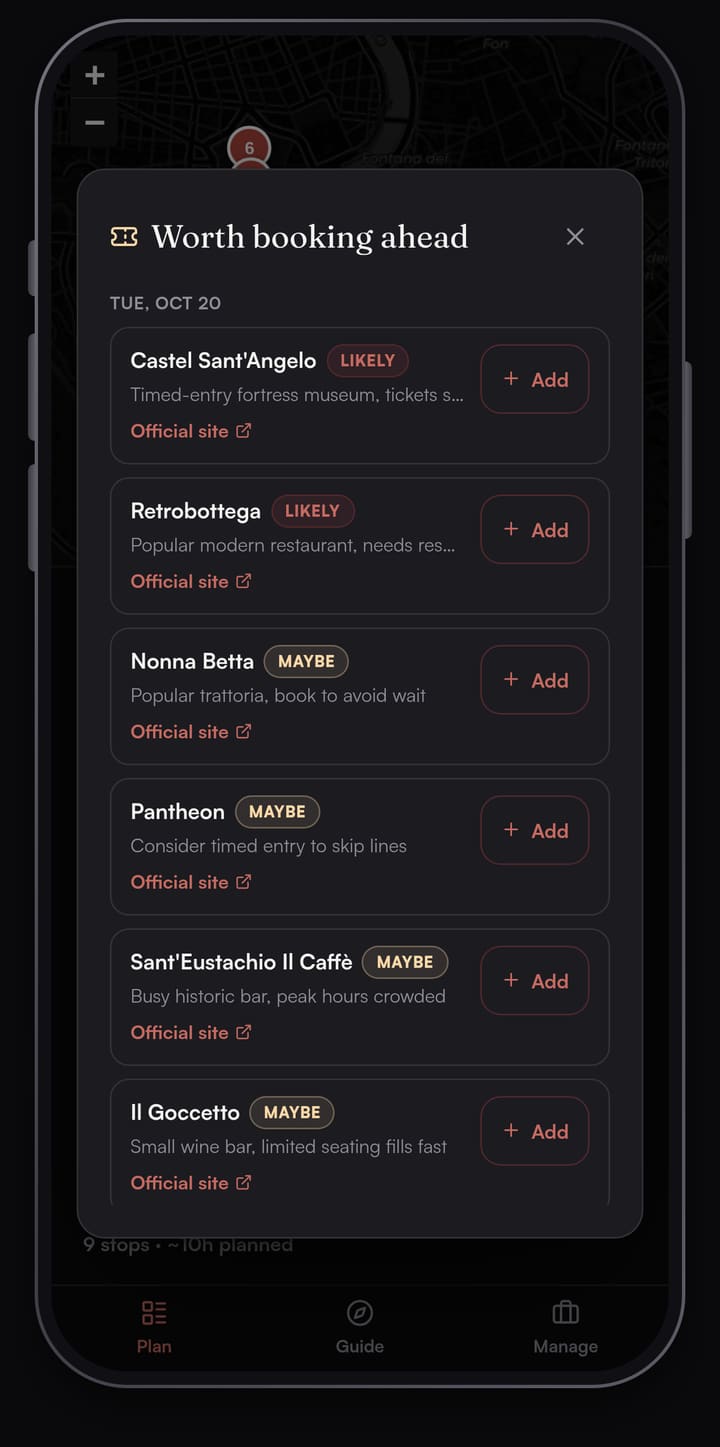
Restaurants count too. A small, popular place at lunch is a fixed point in the same way a museum slot is. If it takes bookings, book it, and build the hours around it.
Step 4: Anchor the day on meals and opening hours
With the tickets known, set the clock. I place things in this order:
- Fixed times first. Timed tickets, tours with a start time, a booked lunch.
- Meals next. Breakfast near the first stop, lunch around midday in the middle of the area, dinner near the last stop. Lunch in the middle of the area keeps the afternoon close by.
- Everything else around them, using each venue's real opening hours.
Check the day of the week before anything else. Many museums close one weekday, and it isn't always Monday:
- The Louvre is closed on Tuesdays, and open until 21:00 on Wednesdays and Fridays.
- The Matenadaran in Yerevan opens Tuesday to Saturday, 10:00 to 17:50, and closes on Sundays and Mondays.
- Westminster Abbey opens to visitors Monday to Saturday, with last entry at 15:30 on weekdays and 15:00 on Saturdays.
That's why the Yerevan walking day is timed for a Saturday. Pick the date first, then check every stop for that date on its official site.
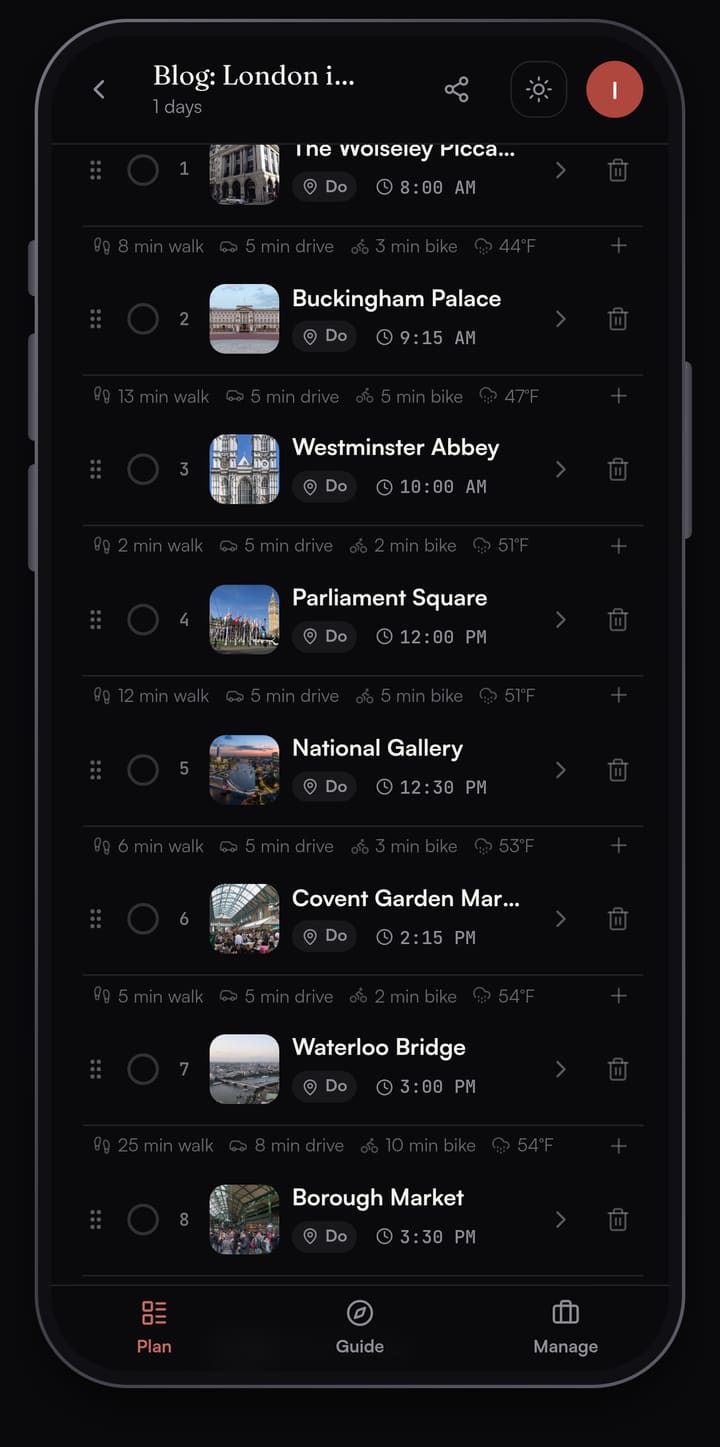
The London day shows the pattern. Breakfast at The Wolseley on Piccadilly, Buckingham Palace, then the Abbey at 10:00, early in its day. Westminster Abbey to Parliament Square is a 2 minute walk on the plan, so the whole morning stays in one corner of the city before the day moves on to Trafalgar Square and the National Gallery. The full day is in the London one day walking itinerary.
Step 5: Leave slack
If the plan fits the day to the minute, you'll be behind by lunch. Lines, security checks, a slow lunch and a wrong turn all take time the map doesn't show. Some rules of thumb I use:
- Pad the big stops. A major museum takes longer than you think. If you want two hours inside, plan two and a half.
- Add time to every walk. A 10 minute walk on the map turns into 15 with crossings, photos and a coffee.
- Keep one gap. Leave 30 to 60 minutes free in the afternoon. If the morning runs late, the gap absorbs it. If it doesn't, sit in a park.
- Know what to cut. Mark one stop as optional (the last one before dinner works well), so the day ends on time even when it slips.
Security is a real time cost at some sights. The Gateway Arch, for example, lists security screening for all visitors on its visit page.
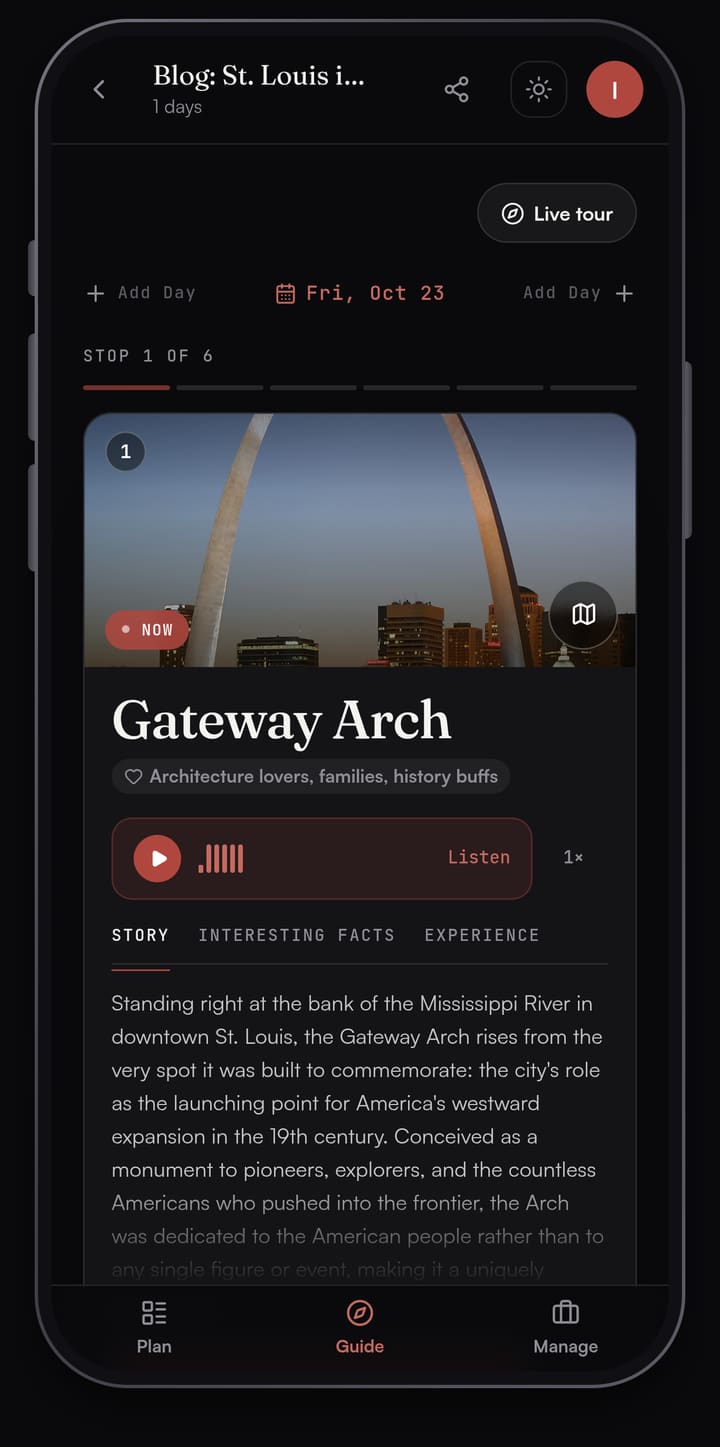
On the day itself, Passage AI's Guide opens each stop as you arrive, with a story about the place, facts and tips. Tap Listen to hear it. Live tour shows the landmarks near you as you walk. Your saved plan opens offline too, so a weak signal between stops leaves the day in your pocket.
How to plan a walking itinerary for your own city
Here's the method as a checklist you can run the night before:
- Mark your two or three must-sees on a map. Keep the ones that fit inside one walkable area; move the rest to another day.
- Add five to seven stops in that area, including meals. Fewer if two of them are big museums.
- Line them up edge to edge, so the walk never doubles back.
- List every stop that sells timed tickets or takes reservations. Book those first.
- Put the fixed times in, then breakfast, lunch and dinner, then everything else.
- Check each stop's official site for your exact date: closing day, last entry, holiday hours.
- Add slack: extra time inside the big stops, extra minutes on each walk, one free gap in the afternoon.
- Save the plan where you can open it without a signal.
To do it in Passage AI: create a trip for the city and date, tap "Suggest a day for me" with your pace, run Optimize and check the preview, then tap Need tickets? and book what it flags on the official sites. That handles steps 1 to 5 of the checklist. The rest is checking your date on each official site and adding slack.
Walking days built with this method
Every one of these days was planned in Passage AI with the five steps above, then checked stop by stop against official sites.
Big cities
- Rome's historic centre in one day: the Pantheon, Piazza Navona and the Castel Sant'Angelo, with walk minutes and what to book.
- London in one day: Piccadilly to the City, ten stops, Abbey hours and prices.
- Paris in one day: Notre-Dame to the Eiffel Tower along the Seine, ten stops.
- Yerevan in one day: Republic Square, the Vernissage, the Matenadaran and the Cascade, timed for a Saturday.
- St. Louis in one day: the Gateway Arch, the Old Courthouse, Citygarden and City Museum.
Small towns
- Galena, Illinois: the Dowling House, Main Street, U.S. Grant's home and a wine tasting.
- Hermann, Missouri: two German heritage sites, two wineries, lunch and dinner.
- Ste. Genevieve, Missouri: nine stops among the French colonial houses.
Small towns are the easiest place to try the method. The stops sit close together, so step 2 almost does itself, and step 4 (the day of the week) does most of the work, because small-town museums, house tours and tasting rooms can keep short hours.
FAQ
How many stops should a walking itinerary have?
Five to seven in a big city, counting meals, is a full day at a comfortable pace. Two big museums bring that down to about five. In a small town where the stops sit a block apart, eight can work. The numbers, city by city, are in how many sights you can see in a day on foot.
How far can you walk in a day of sightseeing?
The walking itself is rarely the limit. At about 5 km/h, 10 km of walking is two hours spread over a whole day. What fills the day is time inside, lines and meals. Plan the stops first and let the distance follow from the area you picked.
Should I plan walking times from a map?
Use the map to group stops and set the order, and leave a little time on each leg for photo stops. In Passage AI, walk times are straight-line estimates between stops, and Directions opens your maps app for the street route when you set off.
What should I book before a walking day?
Anything with a timed entry, a tour with a fixed start, and any small, popular restaurant you have your heart set on. Check each one's official site. Need tickets? in Passage AI flags the stops on your trip worth booking ahead and links to their official sites.
Which day of the week is best for a city walking day?
It depends on the city. Look up the closing day of every museum on your list before you pick the date: the Louvre closes on Tuesdays, the Matenadaran on Sundays and Mondays, and Westminster Abbey lists Sundays as open for services.
How this was made: planned in Passage AI between 6 and 10 October 2026 (the Rome, London, Paris, Yerevan, St. Louis, Galena, Hermann and Ste. Genevieve days), facts checked on 11 October 2026 against the official sites of the Louvre, the Matenadaran, Westminster Abbey and the Gateway Arch, written by Edward.
Cover photo: Guilhem Vellut on Wikimedia Commons (CC BY 2.0, cropped)
