Passage AI vs TripIt: a TripIt alternative that plans your days
If you're looking for a TripIt alternative because you want help with what to do each day, you may not need to replace TripIt at all. TripIt organizes your bookings: forward a flight or hotel confirmation and it builds your itinerary. Passage AI plans the days between them. It puts your stops in walking order with meals in place, flags what to book ahead, and opens a story for each stop when you get there. For most trips, use both: TripIt for the bookings, Passage AI for the days.
I'm Edward, and I build Passage AI. Every TripIt claim below links to tripit.com, the TripIt Help Center or TripIt's App Store listing, all read on October 17, 2026.
Last checked: Oct 2026. Features and prices change, so check each app before you pay.
What TripIt does
TripIt's homepage puts it in one line: "You handle the booking, TripIt builds your itinerary." Its how it works page has three steps. Forward your confirmation emails to plans@tripit.com, get one itinerary for the trip, then open it in the app.
There are three ways to get plans in, per its help article:
- Forwarding confirmation emails to plans@tripit.com, from any booking site.
- Inbox Sync, which adds travel plans from a connected Gmail, Yahoo or Microsoft inbox.
- Adding plans by hand, such as a meeting or an activity, in the app or on the website.
The free version (listed here) keeps the trip in one place across devices, syncs it to your calendar, shares plans by text or email, and stores PDFs, photos and QR codes with your plans. TripIt's help center says your trip details stay readable with no connection, as long as you stay signed in to TripIt.
TripIt Pro is about getting there. It sends real-time flight status alerts, check-in reminders 24 hours before a flight, gate and terminal changes, and a "Go Now" alert for when to leave for the airport. It also tracks seats, fares and reward points, and shows airport maps with walking directions to your gate. Pro costs $49 a year on tripit.com after a free 30-day trial; the US App Store lists it at $48.99 a year.
The App Store listing shows a 4.8 rating from more than 312,000 ratings, and TripIt turns 20 this year.
What TripIt leaves to you
A TripIt itinerary is a list of things you already booked: the flight, the hotel, the rental car, a dinner reservation. The hours in between are blank until you fill them. You can add an activity by hand, but TripIt's homepage, Pro page, free features page and App Store listing don't describe any tool that suggests what to see, orders a day's stops for walking, or checks your plans for tickets that sell out.
That's the gap people mean when they search for a TripIt alternative. TripIt tells you when your flight lands. What you do with the eight hours after you check in is up to you.
What Passage AI does with the same trip
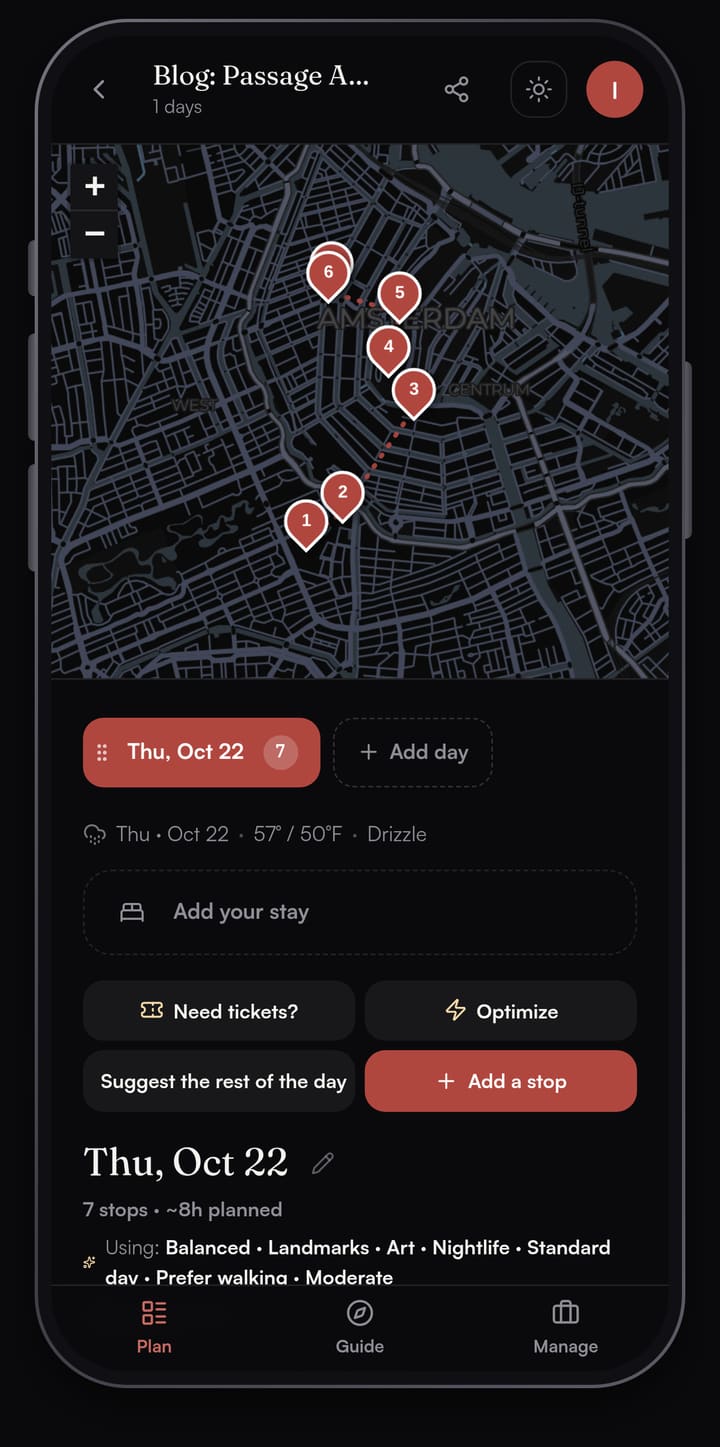
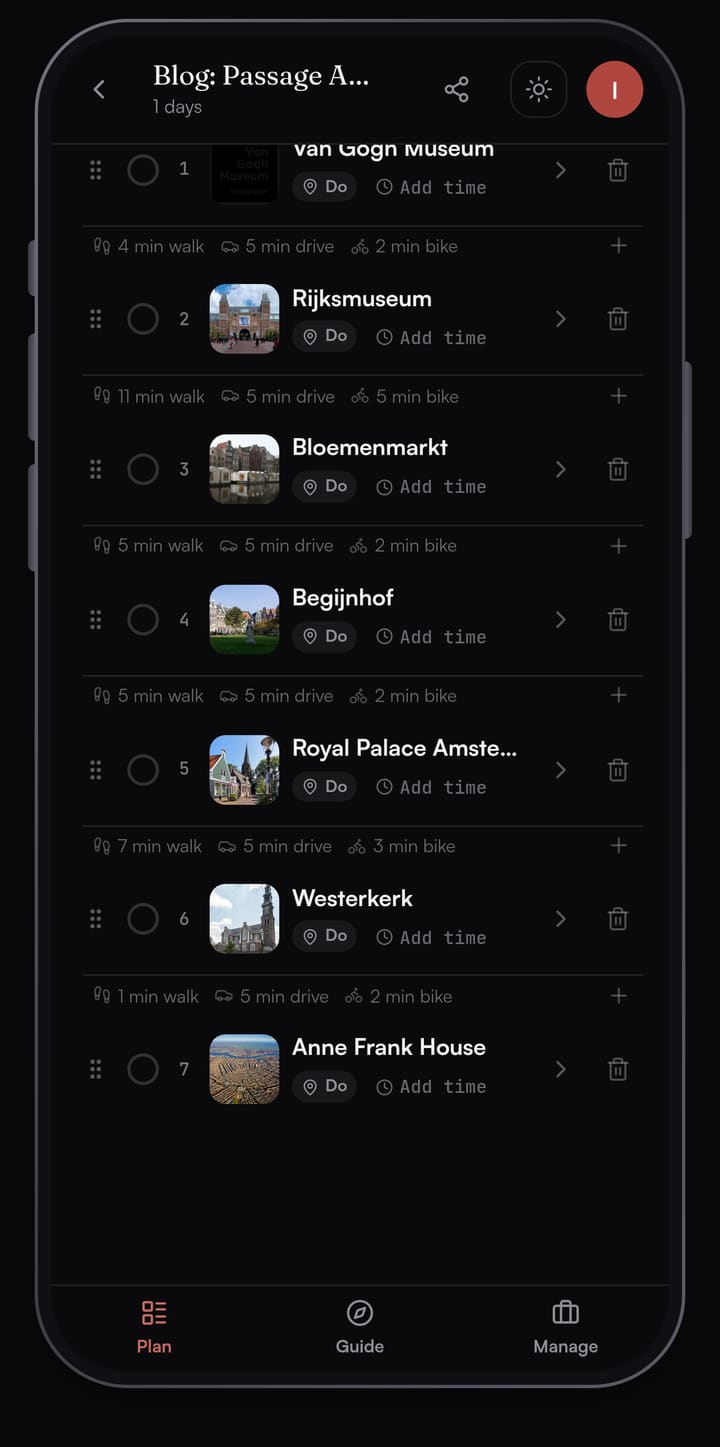
Passage AI plans the day itself. I built one Amsterdam day in it for a Thursday in October, with seven stops from the Van Gogh Museum to the Anne Frank House.
A day in walking order
Search for the places you want and add them, or tap "Suggest a day for me" and Passage AI drafts a full day of real places in the order you'd walk them, with breakfast, lunch and dinner at sensible times. Between stops it shows the walk, drive and bike time. On this day the longest walk is 11 minutes, from the Rijksmuseum to the Bloemenmarkt, and the Westerkerk sits a 1 minute walk from the Anne Frank House. Walk times are straight-line estimates between stops; Directions opens your maps app for the street route.
Optimize for a shorter walk
Add stops in any order and tap Optimize. Passage AI reorders the day into a shorter walk and shows you the new order first, with each moved stop's old position and the minutes of walking you'd save. Nothing changes until you tap Apply. Optimize is free.
Need tickets? before you fly
Tap Need tickets? and Passage AI scans the whole trip for stops worth booking ahead. On the Amsterdam day it flagged four. The Anne Frank House came first, marked likely: "Sells out weeks ahead, timed-entry required." The Van Gogh Museum and the Rijksmuseum were also likely, and the Royal Palace was a maybe. Each flag links to the official site. The Bloemenmarkt and the Begijnhof went in the walk-in friendly pile.
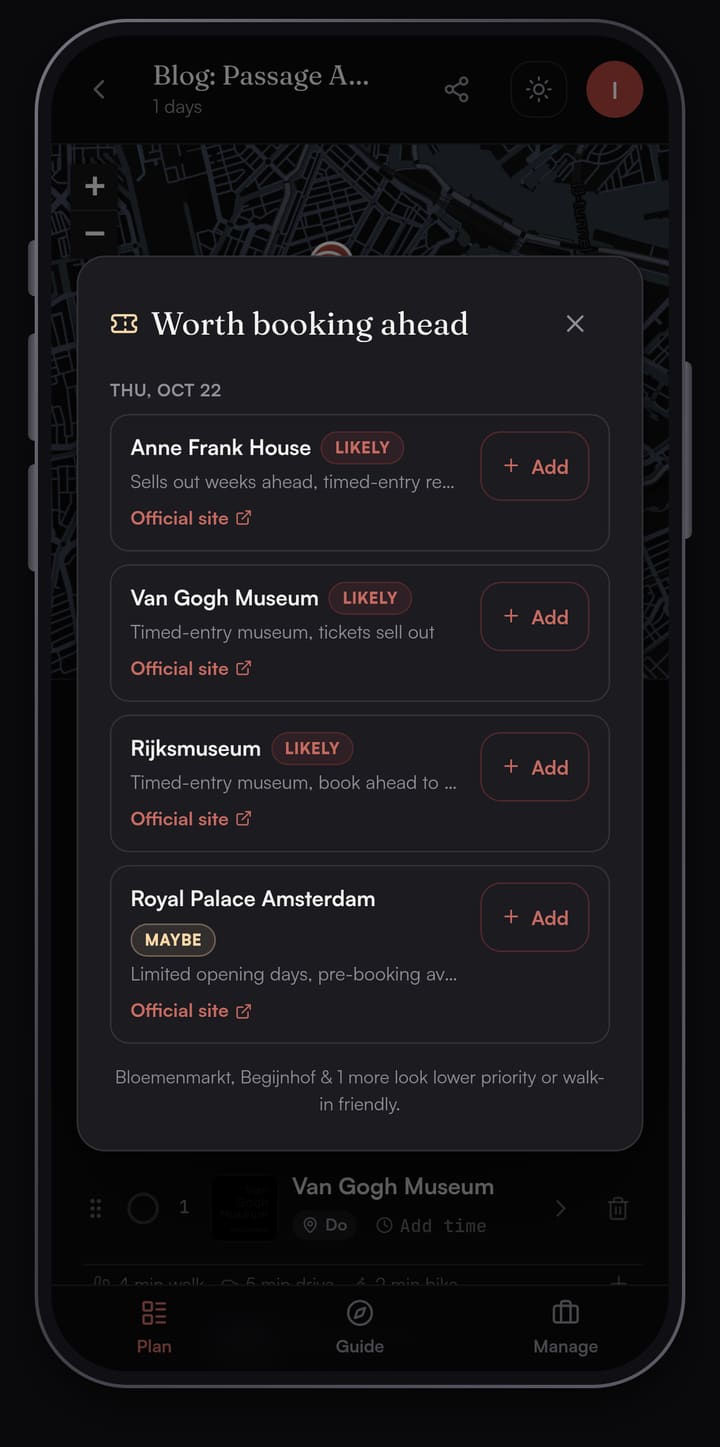
Tap Add on a flag and that stop goes on your reservation checklist.
Reservations sit on the stop
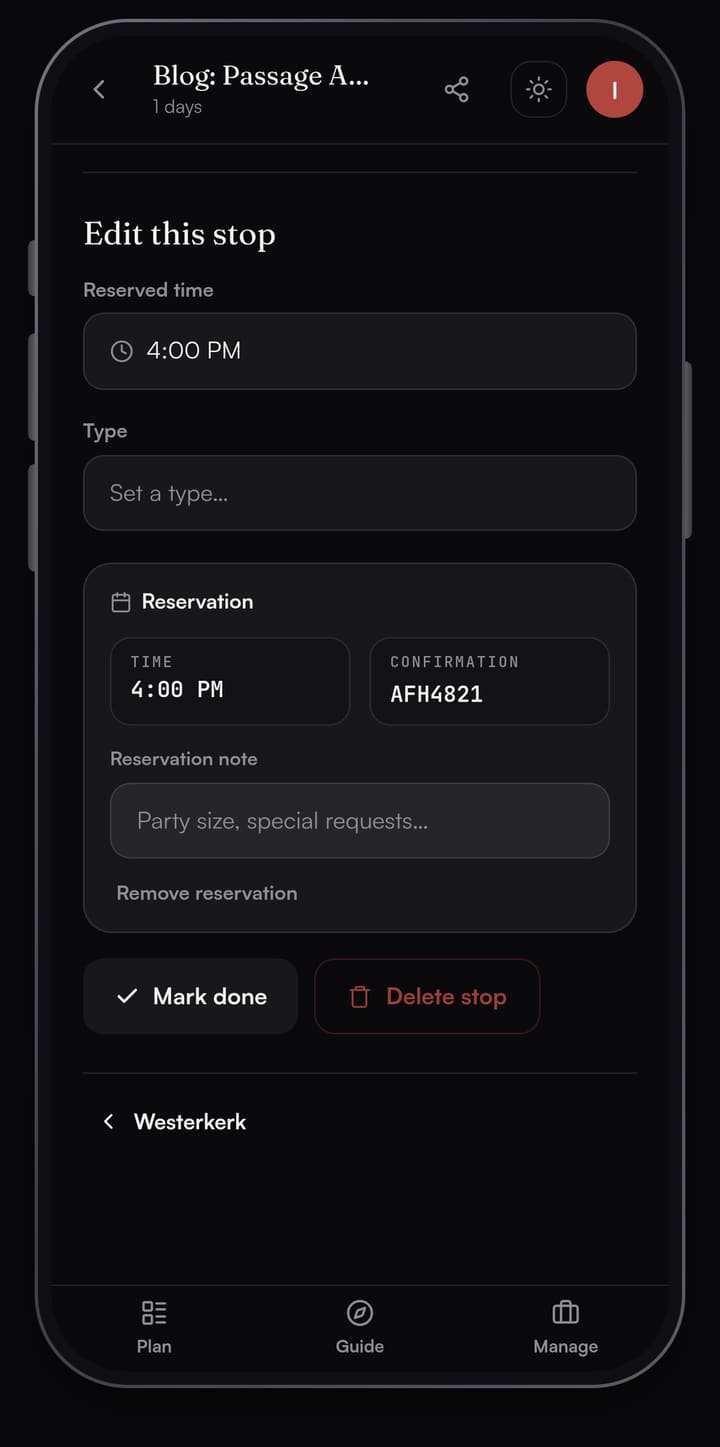
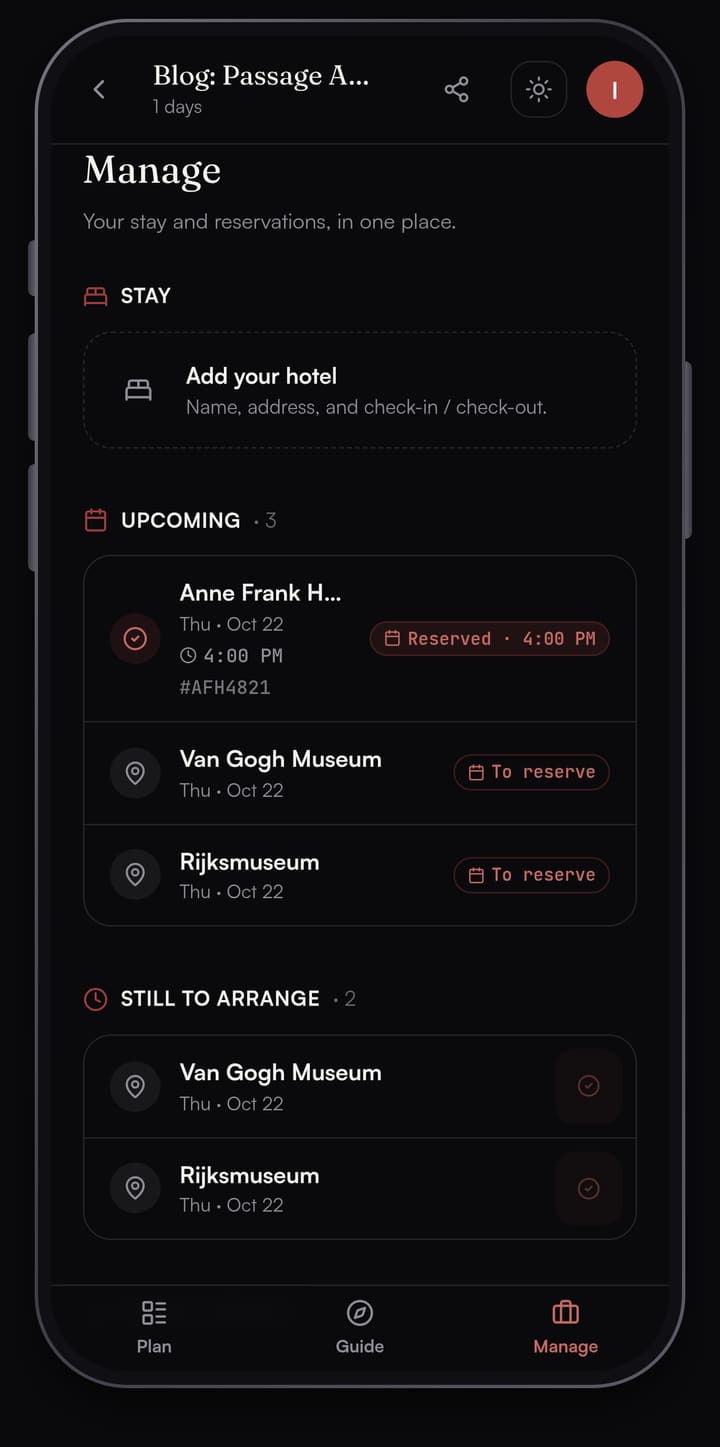
This is the part that overlaps with TripIt. Once you book the Anne Frank House on its own site, open the stop in Passage AI, set the time on your ticket, and tap Lock reservation. Type the confirmation number in and it stays with that stop.
Open the Manage tab and you get "Your stay and reservations, in one place." Your hotel goes under Stay, with check-in and check-out. Upcoming lists every reservation by date and time, and Still to arrange shows what you haven't booked yet.
A Guide at each stop
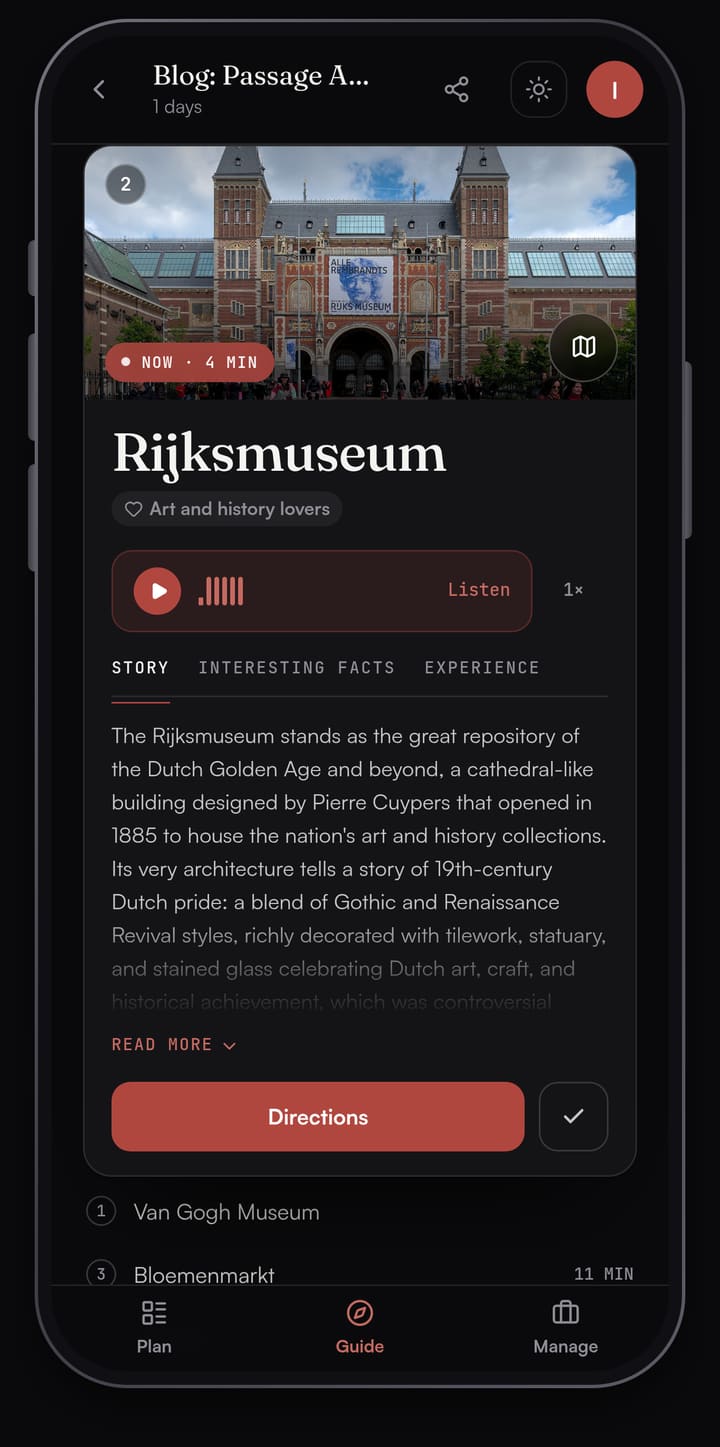
The Guide tab turns the day into a deck of stop cards. Walk within about 40 m of a stop and it opens. Each card has Story, Interesting Facts and Experience tabs, and Listen reads the story aloud. Between stops, Live tour shows Wikipedia landmarks within about 300 m of where you're standing.
Passage AI vs TripIt: side by side
| Passage AI | TripIt | |
|---|---|---|
| Gets bookings in | Save a confirmation number on the stop | Forward emails to plans@tripit.com, or Inbox Sync |
| Plans what to do | Suggest a day: stops in walking order, meals placed | Not listed |
| Reorder a day | Optimize, free | Not listed |
| What to book ahead | Need tickets? scans the trip | Not listed |
| Stories at each stop | Guide, with Listen for audio | Not listed |
| Flight alerts | Use TripIt for this | Pro |
| Airport maps | Use TripIt for this | Free maps, Pro walking directions |
| Hotel and stay | Stay with check-in and check-out | Lodging plans from your emails |
| Offline | Saved trip plans open | Trip details open while signed in |
| Sharing | Edit or view-only links | Text, email or apps; Inner Circle with Pro |
| Platforms | Web and iPhone, Android coming soon | iPhone, Android and web |
| Price | Free; Trip Pass $15 or Annual Pro $50 a year | Free; Pro $49 a year |
Most rows point one way. TripIt covers the travel days: flights, gates, hotels and cars. Passage AI covers the days on the ground.
How to use TripIt and Passage AI together
This is the split I'd use for a city break like Amsterdam:
- After you book the flight and hotel, forward the confirmations to TripIt. It builds the trip and, with Pro, watches the flight for delays and gate changes.
- Plan each day in Passage AI. Pick the city and dates, add the places you care about or tap "Suggest a day for me", then tap Optimize for a shorter walk.
- Run Need tickets? and book the timed entries on the official sites. In Amsterdam, the Anne Frank House sells tickets only online for a set time slot, and every Tuesday at 10:00 CEST it releases tickets for visits six weeks later. The Rijksmuseum asks every visitor to book a start time; it's open daily from 9:00 to 17:00. The Van Gogh Museum sells all its tickets online, so check its hours there before you go.
- Save each confirmation number on its stop in Passage AI. You can forward the same emails to TripIt too, so everything also sits in one list with your flights.
- On the day, open the Guide. Each stop opens with its story as you arrive, and Directions hands off to your phone's maps app.
Pricing compared
Planning by hand in Passage AI is free: adding stops, maps, travel times, weather, Optimize and sharing. AI features are free up to monthly limits, including 3 suggested days, 3 Need tickets? scans and 25 place stories. Two paid options lift the limits:
- Trip Pass: $15 once on the web ($14.99 in the App Store). Unlimited AI on one trip, up to 14 AI-planned days. It doesn't renew.
- Annual Pro: $50 a year on the web ($49.99 in the App Store), for every trip. There's no monthly plan.
TripIt's itinerary features are free. TripIt Pro is $49 a year on tripit.com after a free 30-day trial, or $48.99 a year in the US App Store, and it renews each year. It adds flight alerts, check-in reminders, seat and fare tracking, point tracking and airport walking directions.
If you fly often for work, TripIt Pro earns its price on the airport side. For one city trip, a $15 Trip Pass covers the planning side.
Which should you pick?
- You fly a lot and juggle several bookings per trip: TripIt. Forwarding a confirmation email is the quickest way to collect flights, hotels and cars in one list.
- You're going to a walkable city and want the days planned: Passage AI. It orders the stops, places the meals and flags the tickets.
- You want both: use TripIt for the flights and hotel, and Passage AI for the days in between. They don't compete for the same job.
An Android app for Passage AI is coming soon; on Android today you can plan in the browser at mypassage.ai.
FAQ
Is Passage AI a TripIt alternative?
For planning what to do each day, yes. TripIt organizes the bookings you forward to it. Passage AI plans the days themselves: stops in walking order, meals placed, tickets flagged, and a story at each stop. You can use both on the same trip.
Can TripIt plan my days for me?
TripIt's website and App Store listing describe an itinerary built from your bookings, plus plans you add by hand. They don't list a tool that suggests places or orders a day's stops. That's the part Passage AI does.
Is TripIt free?
Yes. Building an itinerary from forwarded emails is free. TripIt Pro costs $49 a year on tripit.com ($48.99 in the US App Store) and adds flight alerts and travel reminders.
Can I save my booking confirmations in Passage AI?
Yes. Lock a reservation on a stop and type in the confirmation number. The Manage tab then lists your stay and every reservation in one place.
Does Passage AI work offline?
Yes. Your saved trip plans open without a signal.
How this was made: planned in Passage AI on Oct 17, 2026 (an Amsterdam day for Thursday, Oct 22). TripIt facts were checked against tripit.com, the TripIt Help Center and TripIt's App Store listing; venue facts against the Anne Frank House, Rijksmuseum and Van Gogh Museum sites. Written by Edward.
Cover photo: Zairon on Wikimedia Commons (CC BY-SA 4.0, cropped)
