Wanderlog alternatives: trip planners for days on foot
Most Wanderlog alternatives fix one piece of the job. TripIt keeps your bookings in one itinerary. Mindtrip and Layla plan by chat and handle bookings. Google Maps lists hold the places you've saved. If your trip is mostly days on foot in a city, Passage AI is the one built for that: it orders each day for walking with meals in place, checks the trip for tickets to book ahead, and opens a story at each stop.
I'm Edward, and I build it. Every claim about the other apps below comes from their own websites, help centers or App Store listings, linked where it appears. For the head-to-head version, read Passage AI vs Wanderlog.
Last checked: Oct 2026. Prices and features change, so check before you pay.
Why people look for Wanderlog alternatives
Wanderlog's basic planner is free for as many trips as you want. Two of the tools that matter most on a walking day sit behind Wanderlog Pro: its help center says "Pro members can use the optimize route feature", and "Pro members can save their trip plans" for use without a connection.
On the US App Store, Wanderlog Pro is sold as annual plans from $31.99 to $59.99 a year, or monthly plans at $5.99 and $16.99.
Maybe you want a day reordered without a subscription. Maybe you mostly need flight and hotel confirmations in one place, or you'd like someone to plan and book the whole trip. Each of those points to a different app.
The 5 best Wanderlog alternatives at a glance
| App | Best for | Free to use | Paid plan |
|---|---|---|---|
| Passage AI | Walking days in a city | Yes | Trip Pass $15 once, or $50 a year |
| TripIt | Bookings in one itinerary | Yes | TripIt Pro $49 a year |
| Mindtrip | Assistant that learns your style | Yes | None listed on the App Store |
| Layla | Trips planned by chat, booked by experts | Yes | $9.99 a month or $49.99 a year |
| Google Maps lists | Saving places to visit | Yes | None |
1. Passage AI: best Wanderlog alternative for walking days
Passage AI plans the part of a trip you spend on your feet. I built a test day in Lisbon to show how it works, and the screenshots below come from that trip.
A day in walking order, with meals placed
Pick a city and dates, then tap "Suggest a day for me". It drafts a full day of real places in the order you'd walk them, keeps neighboring stops together, and puts breakfast, lunch and dinner at normal times. Each stop gets a time, and the walk to the next one shows in minutes. Choose a relaxed pace for 3 to 4 activities, or a packed one for 7 to 9 stops counting meals.
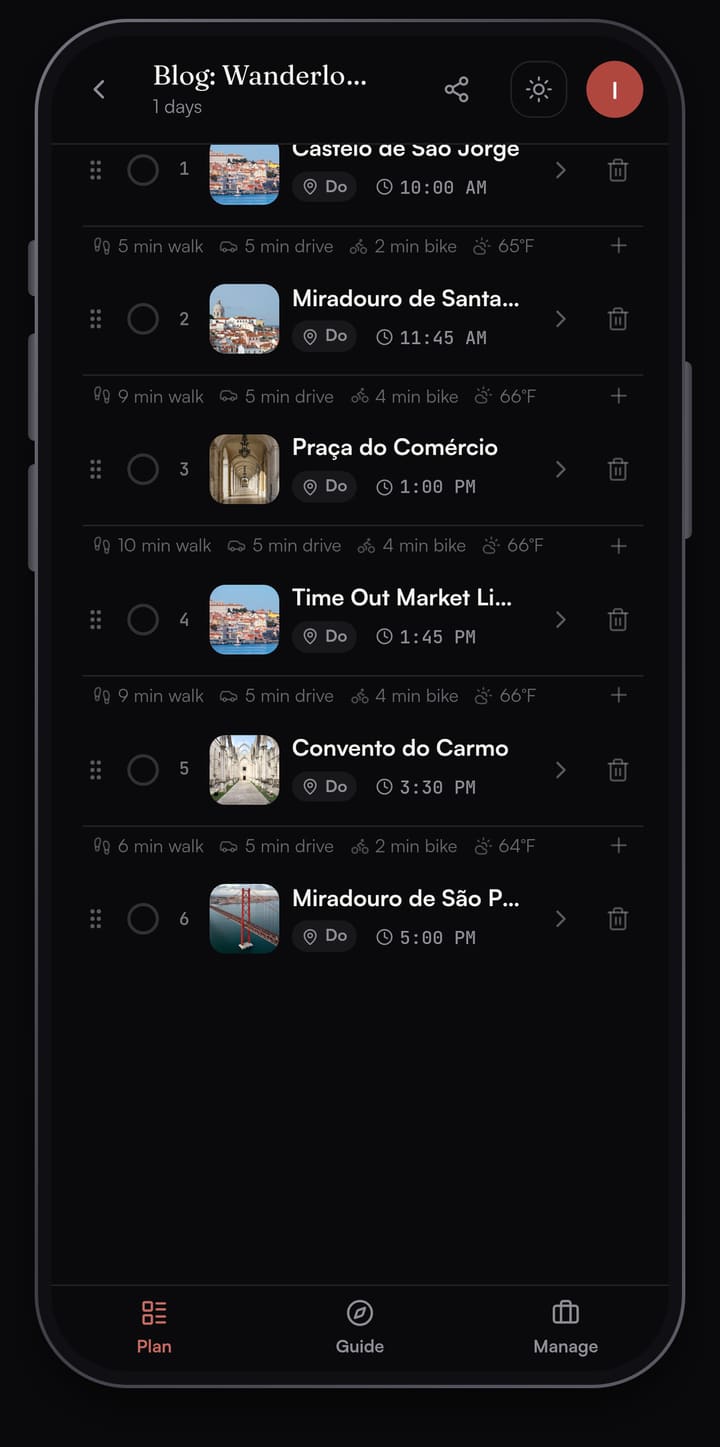
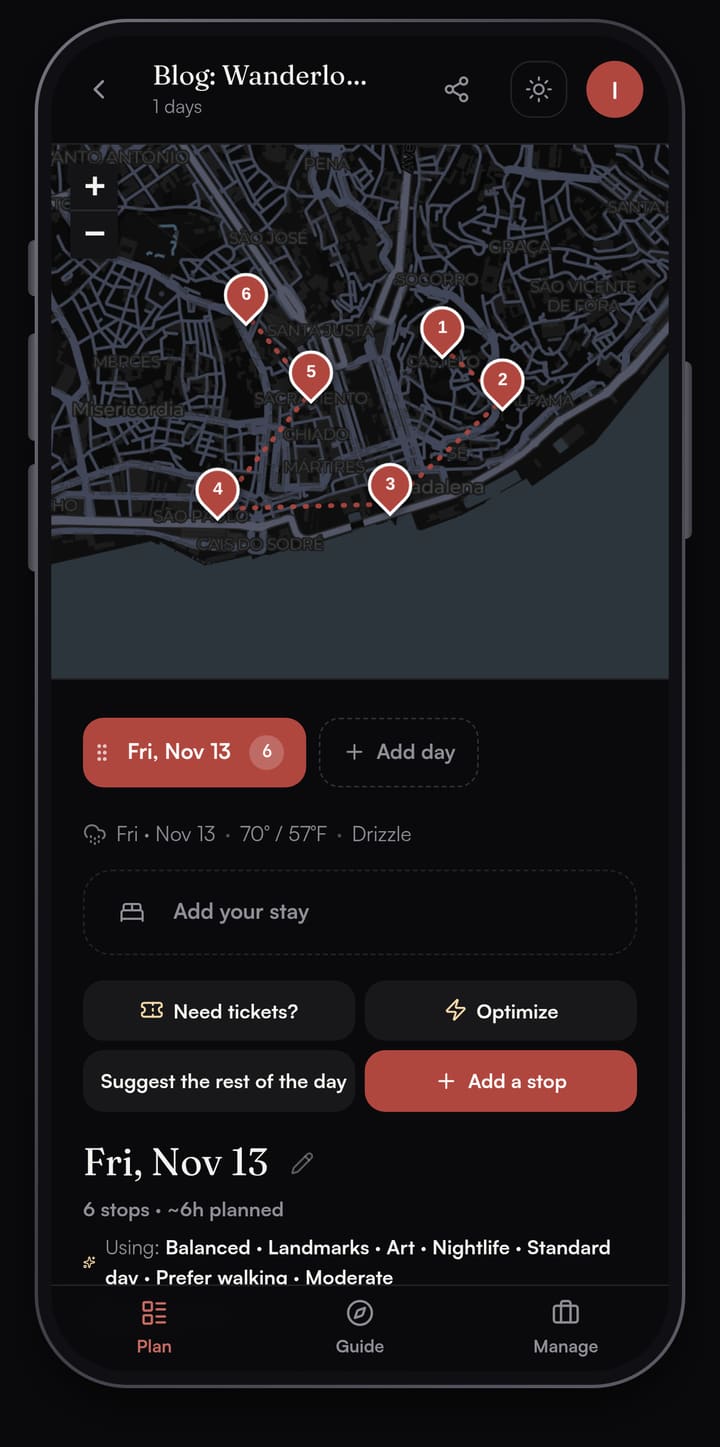
For my Lisbon test day I picked six stops with Add a stop and gave each a time. The day starts at Castelo de São Jorge, drops past the Santa Luzia viewpoint to Praça do Comércio, stops for lunch at Time Out Market, then climbs to the Carmo Convent and ends at the São Pedro de Alcântara viewpoint.
The map at the top of the day pins every stop in order, so you can see the route before you set out.
Optimize, free, with a preview
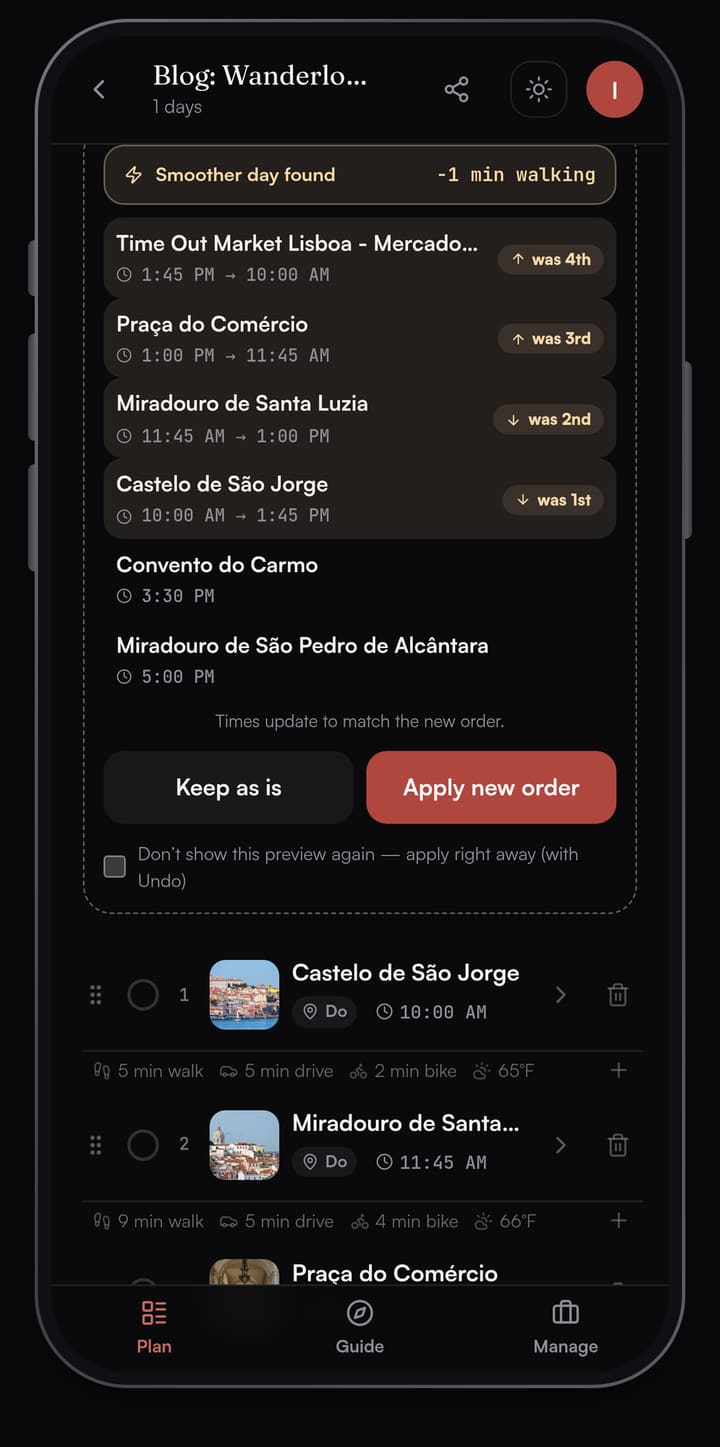
Optimize reorders a day to cut walking. It shows the new order first, with a badge on each moved stop and the minutes of walking you'd save, and nothing changes until you tap Apply. In Wanderlog the same kind of reorder needs Pro.
Need tickets? before you fly
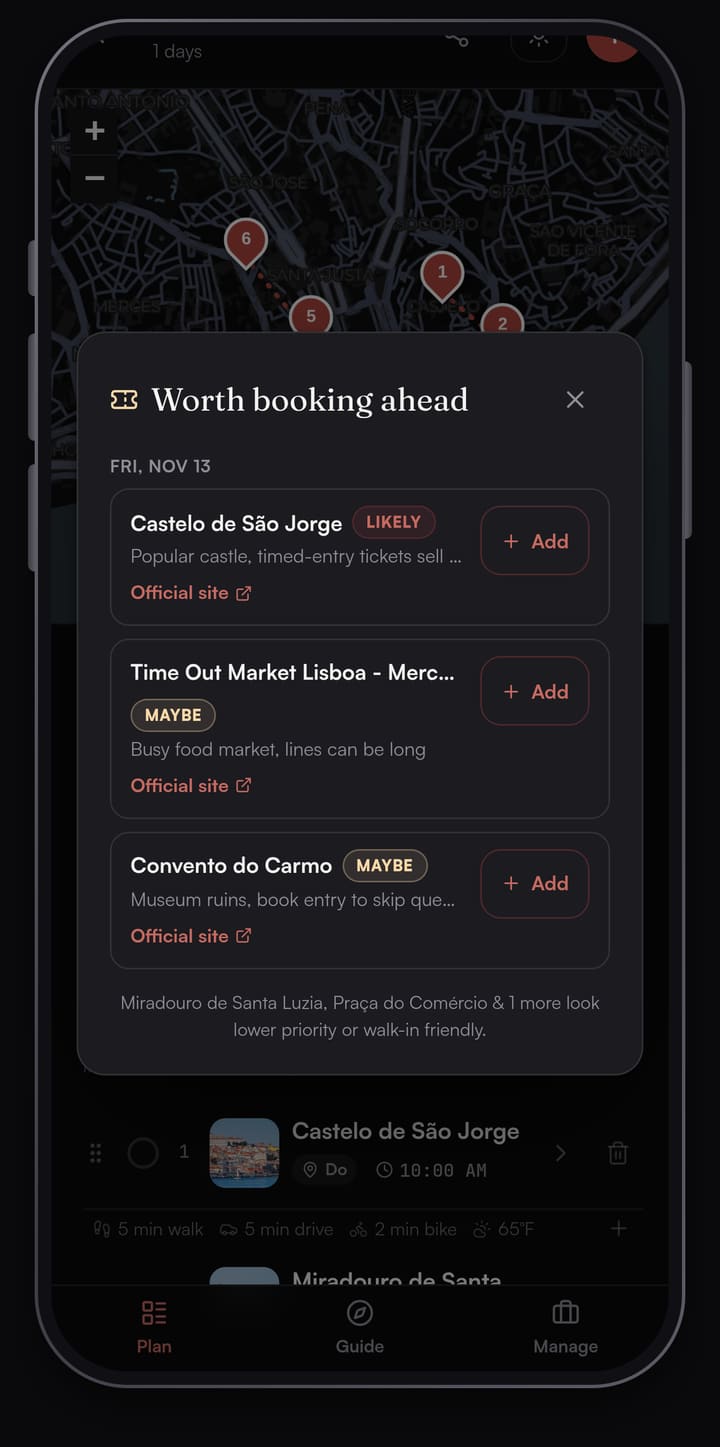
Tap Need tickets? to scan every day of the trip for stops worth booking ahead, like timed-entry sights and busy restaurants. Each flag comes with a short reason and a link to the official site, and you can save the confirmation number on the stop once you've booked.
On my Lisbon day it flagged three of the six stops: Castelo de São Jorge as likely, with Time Out Market and the Carmo Convent as maybes. The two viewpoints and Praça do Comércio came back as walk-in friendly or lower priority.
A Guide at each stop
On the day, the Guide tab turns the plan into a deck of stop cards. Walk within about 40 m of a stop and its card opens, with a Story, Interesting Facts and Experience tips. Tap Listen to hear the story read aloud. Directions opens your phone's maps app for the street route, and walk times between stops are straight-line estimates.
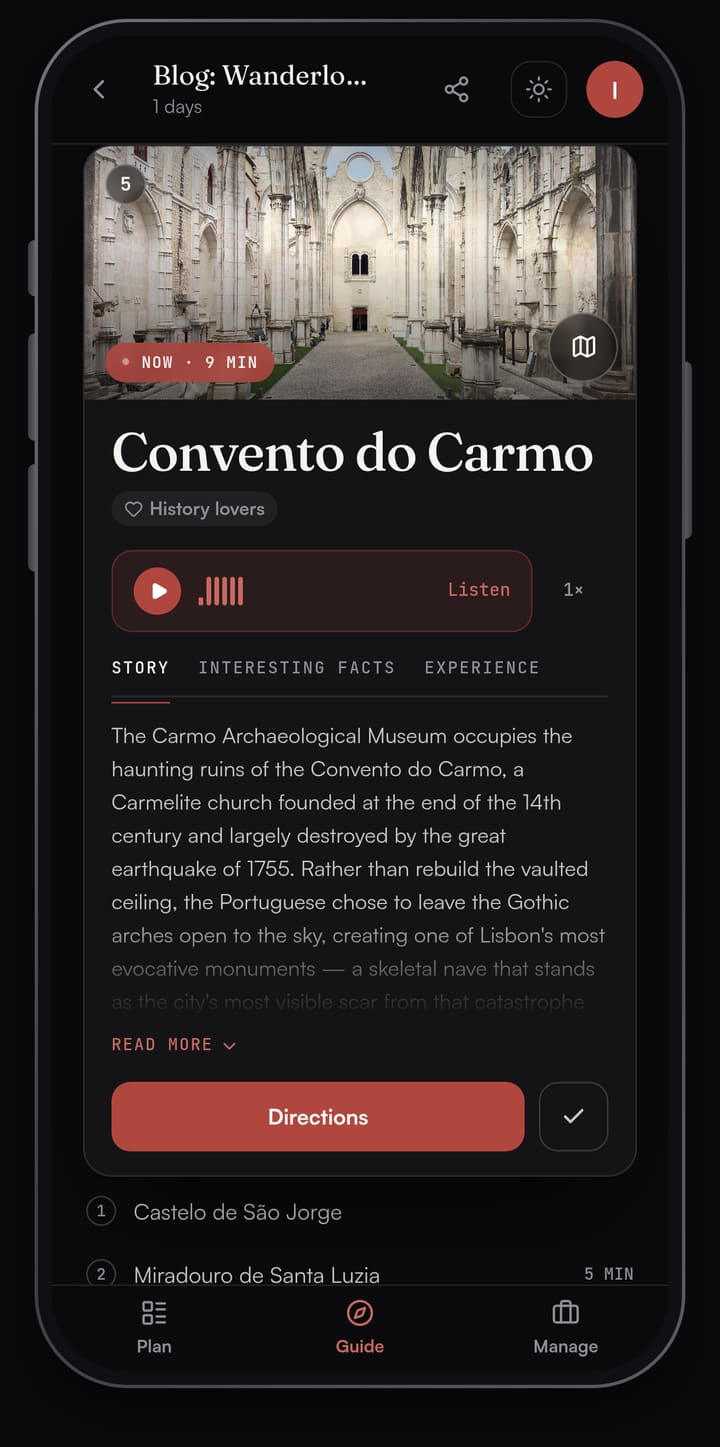
Between stops, Live tour shows landmarks within about 300 m of where you're standing. Sharing is free with edit or view-only links, and a friend can read a shared trip in the browser without an account. Saved plans open offline.
Price: planning by hand is free, Optimize and sharing included. AI features are free up to monthly limits (3 suggested days, 3 Need tickets? scans and 25 place stories a month). A Trip Pass costs $15 once on the web for one trip, or Annual Pro is $50 a year. It runs on the web and iPhone. An Android app is coming soon; on Android today you can plan in the browser at mypassage.ai.
For more on how it compares with chat planners, see the best AI trip planner for walking trips.
2. TripIt: for keeping every booking in one place
TripIt is the alternative for the logistics side of Wanderlog. Its how-it-works page explains the core idea: when you book a flight, hotel, car or other reservation, forward the confirmation email to plans@tripit.com and TripIt adds it to one itinerary for that trip. You can send plans to your calendar or share them. The basic app is free.
TripIt Pro costs $49 a year after a free 30-day trial. It adds alerts such as a seat tracker, connecting-gate directions and baggage claim info when you land.
TripIt's pages describe organizing your bookings. For what you'll do on foot each day, pair it with a day planner. Our Passage AI vs TripIt post covers using the two together.
3. Mindtrip: for an assistant that remembers how you travel
Mindtrip calls itself a personal travel assistant. It learns your preferences and remembers them, so you don't start from scratch each trip. It helps you pick flights, stays and restaurants, and you can book directly on Mindtrip. Trips keep your itinerary, ideas and bookings in one place, and you can set up agents that watch things like flight prices and alert you.
The Mindtrip iPhone app is free, and its US App Store listing shows no in-app purchases (checked Oct 2026).
Mindtrip suits travelers who want one assistant from inspiration to booking. For how it compares on walking days, see Passage AI vs Mindtrip.
4. Layla: for a trip planned by chat and booked for you
Layla builds a trip around your dates, budget and style in a chat, then its travel experts check the plan and book the arrangements once you approve it. Its site says planning is free, with no subscription or planning fee; if you book through Layla, you pay for the travel arrangements in the booking. It lists a recommended minimum budget of €100 per person per night for the trips it books. Ready-made trip templates show hotels and experiences you can change before booking.
The Layla iPhone app is free, with in-app subscriptions at $9.99 a month or $49.99 a year on the US App Store.
Layla fits a multi-city trip you'd rather hand off. Our Passage AI vs Layla post compares the two for days on foot.
5. Google Maps lists: for a free list of places
If all you used Wanderlog for was saving places, Google Maps does that for free. Its help page shows how to make a list of places you want to visit and set it to private or shared, where you share a link to view or edit.
Google's help page covers saving and sharing places; turning them into an ordered, timed day is up to you. Our Passage AI vs Google Maps saved lists post shows how to turn saved pins into a walkable day.
How to pick a Wanderlog alternative
Start with the part of the trip that takes you the most time to plan.
- A city you'll explore on foot: Passage AI. You get each day in walking order with meals, a check for what to book ahead, and a story at every stop. Our one-day Lisbon walking itinerary is a worked example.
- Lots of flights and hotels to track: TripIt. Forward the confirmations and it builds the itinerary.
- One assistant from ideas to booking: Mindtrip.
- A trip you'd rather hand to someone to book: Layla.
- A free list of places for later: Google Maps lists.
These also work together: keep bookings in TripIt and plan the days in a separate app.
FAQ
What is the best free Wanderlog alternative?
For walking days in a city, Passage AI. Planning by hand is free, including Optimize and sharing, and AI features are free up to monthly limits. For bookings only, TripIt's basic app is free. For saving places, Google Maps lists are free.
Is Wanderlog's route optimizer free?
No. Wanderlog's help center lists Optimize route as a Pro feature. Passage AI's Optimize is free and previews the new order before you apply it.
Which Wanderlog alternatives handle bookings?
Mindtrip lets you book flights, stays and restaurants directly, and Layla's travel experts book the arrangements in a trip you approve. Passage AI plans the days and links you to the official site when a stop needs a ticket.
Can I use TripIt and a day planner together?
Yes. TripIt holds your confirmations, and a day planner such as Passage AI orders what you do each day. Our Passage AI vs TripIt post shows how they fit.
Does Passage AI work offline?
Yes. Your saved trip plans open without a signal.
How this was made: planned in Passage AI on Oct 30, 2026 (a test day in Lisbon). Facts checked on Oct 30, 2026 against the Wanderlog Help Center, Wanderlog's App Store listing, tripit.com, mindtrip.ai, layla.ai, the Mindtrip and Layla App Store listings and Google Maps Help. Written by Edward.
Cover photo: NorbertNagel on Wikimedia Commons (CC BY-SA 4.0, cropped)


